
GoHighLevel AI Tools: Ask AI & AI Agent Studio Guide
GoHighLevel AI Tools: Ask AI & AI Agent Studio Guide
GoHighLevel has been expanding its AI tools fast, and if you have not explored that side of the platform lately, there is a good chance you will be surprised by how much is already built in.
This is not just a basic chatbot or a couple of AI powered shortcuts. GoHighLevel now includes an actual AI Studio with tools that can answer platform questions, handle calls, manage chat conversations, generate content, and even build workflows from a single prompt.
If you are trying to figure out what is available and where each tool fits, this walkthrough will give you a clear picture of what GoHighLevel AI can actually do for a business.
Ask AI: Your built in GoHighLevel assistant
The first tool worth knowing about is Ask AI. This is essentially a smart assistant that lives inside GoHighLevel and understands the platform itself.
That distinction matters. It is not giving broad, generic AI answers. It is trained specifically around GoHighLevel, which means it can help with platform features, setup steps, troubleshooting, and account configuration without sending you off to dig through help docs.
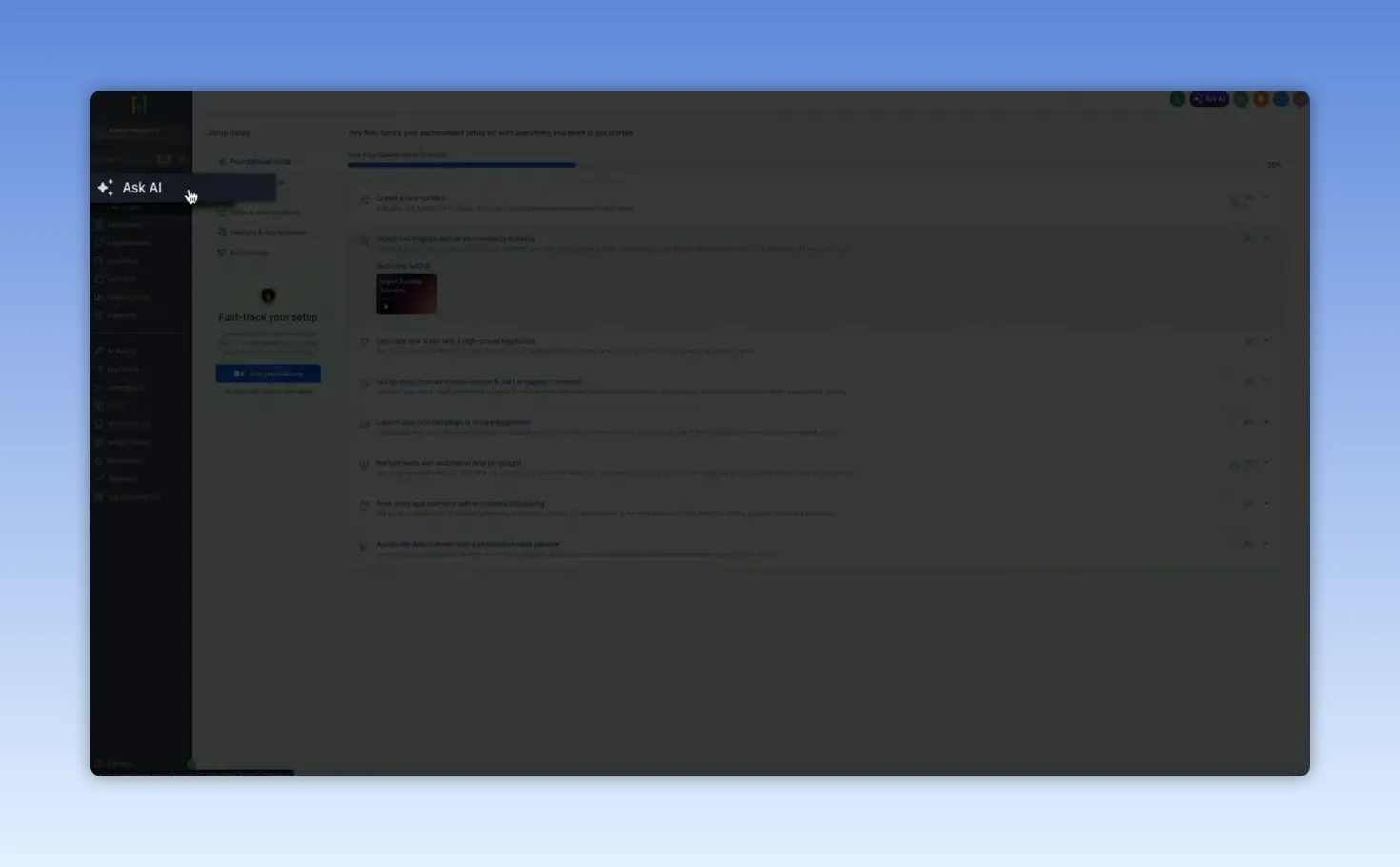
You can find it in the left sidebar under Ask AI, marked with a sparkle icon. The interface feels familiar right away. There is a conversation history on the left, a new chat option when you want to start fresh, and a central input box where you can type your question.
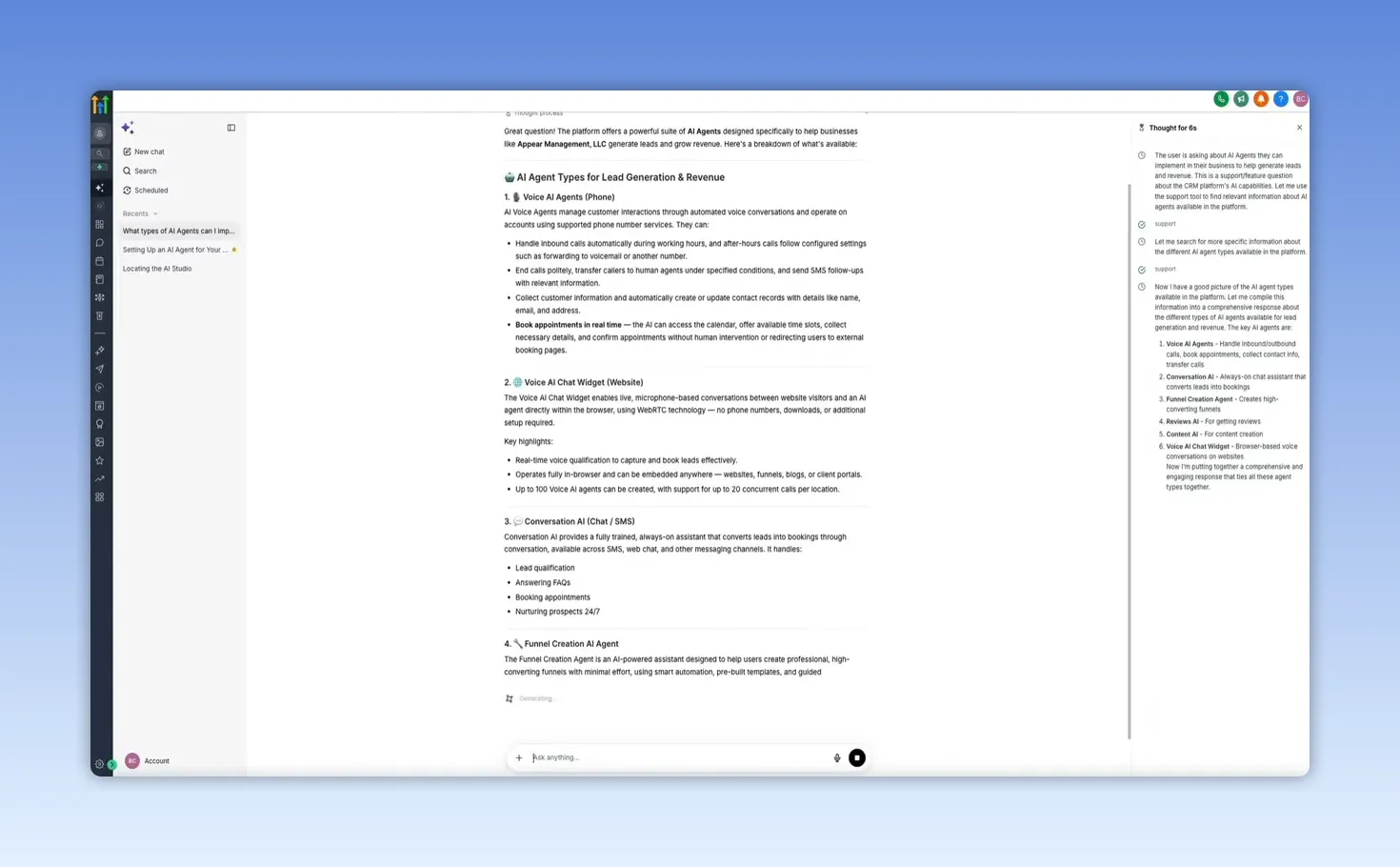
A useful example is asking something strategic, not just technical. For instance, asking what types of AI agents you can implement to generate leads and revenue produces a detailed, platform specific response. Instead of vague suggestions, Ask AI breaks down the actual agent types available in GoHighLevel, such as voice agents, chat widgets, and conversation AI.
What makes it especially useful is that it does not stop at naming features. It explains what each one does, where it fits in a lead generation process, and how the tools can work together as part of a larger system.
It also shows its reasoning on the side while it works, so you can see it searching and assembling the response in real time. That gives the tool a more guided, helpful feel than a standard support bot.
The part I really like is the follow-up flow. Once it gives you an answer, you can keep going in the same conversation and Ask AI will hold the context. So if you say you want help setting up a specific tool, it shifts from explanation mode into setup mode.
For example, asking it to walk through the Voice AI chat widget produces step by step instructions such as:
- Enable the feature in settings
- Configure the agent
- Generate the embed code
- Add it to your site
- Test it live
It even includes practical tips for getting better results. That is what makes Ask AI so useful. It functions more like an on demand GoHighLevel expert than a simple Q&A tool.
AI Agent Studio: Where the business facing AI tools live
Once you move from asking questions to actually deploying AI, the next stop is AI Agents in the left sidebar. This opens GoHighLevel's AI Agent Studio.
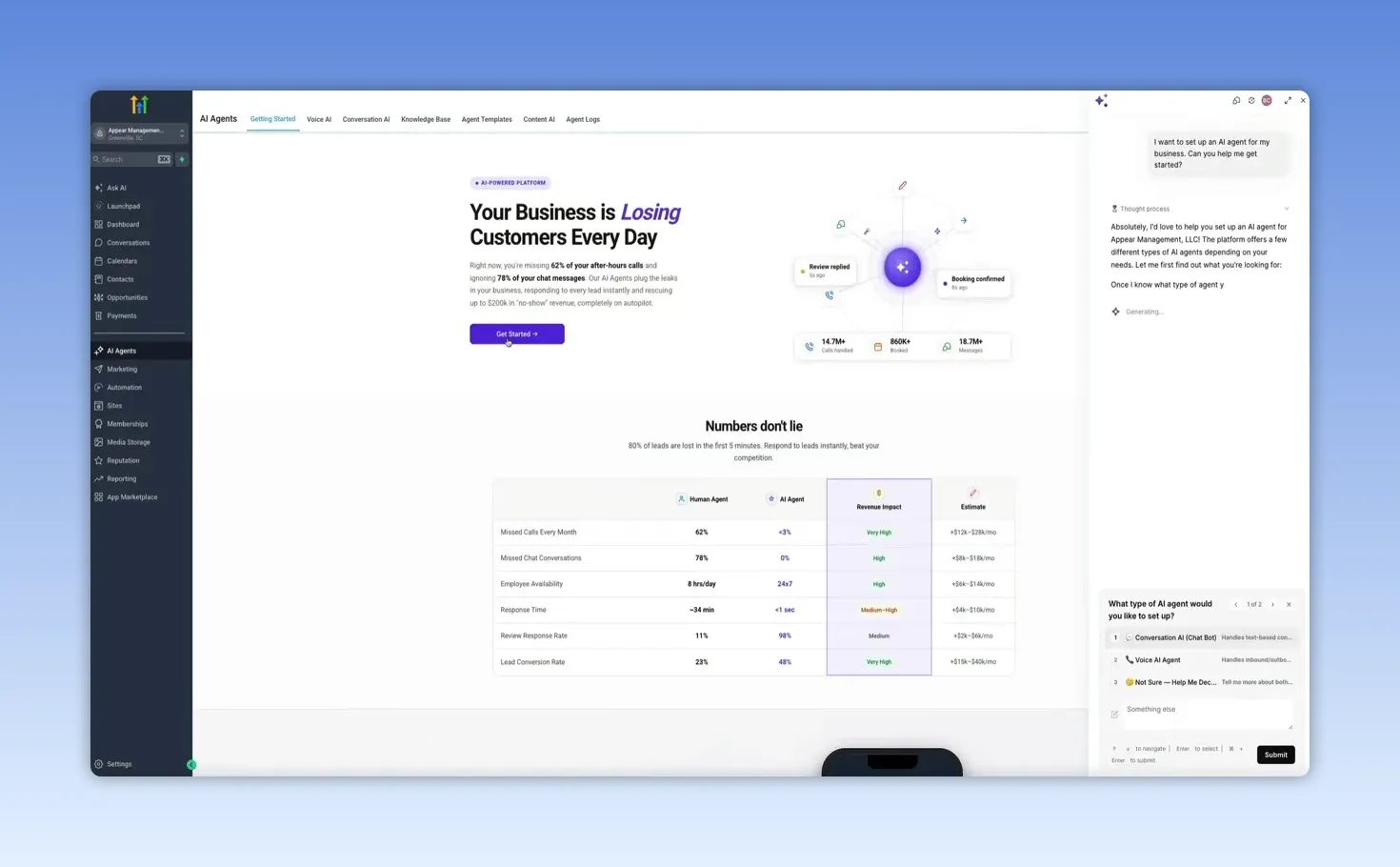
There is a Get Started button that opens a guided setup panel on the right side of the screen. It begins with a built in AI prompt asking what kind of agent you want to set up, which is a nice touch because it removes a lot of the guesswork when you are starting from scratch.
Inside the studio, the key tabs covered here are:
- Voice AI
- Conversation AI
- Content AI
Each one handles a different part of the customer journey.
Voice AI: An AI phone agent that can answer and book around the clock
The Voice AI tab is where you can build an AI support or booking agent that handles phone conversations.
One of the best features here is the built in live testing. You can tap to talk and have a real conversation with the agent before rolling it out. In the demo, the agent handled an appointment booking conversation naturally, responded to follow up questions, and stayed on track even when the conversation tried to zigzag a little.
That is exactly what you want from a phone AI tool. It should not sound robotic, and it should not fall apart the moment someone asks for clarification. A good voice agent needs to be able to:
- Answer questions instantly
- Offer available appointment times
- Collect names and email addresses
- Keep context throughout the conversation
- Stay available 24 hours a day
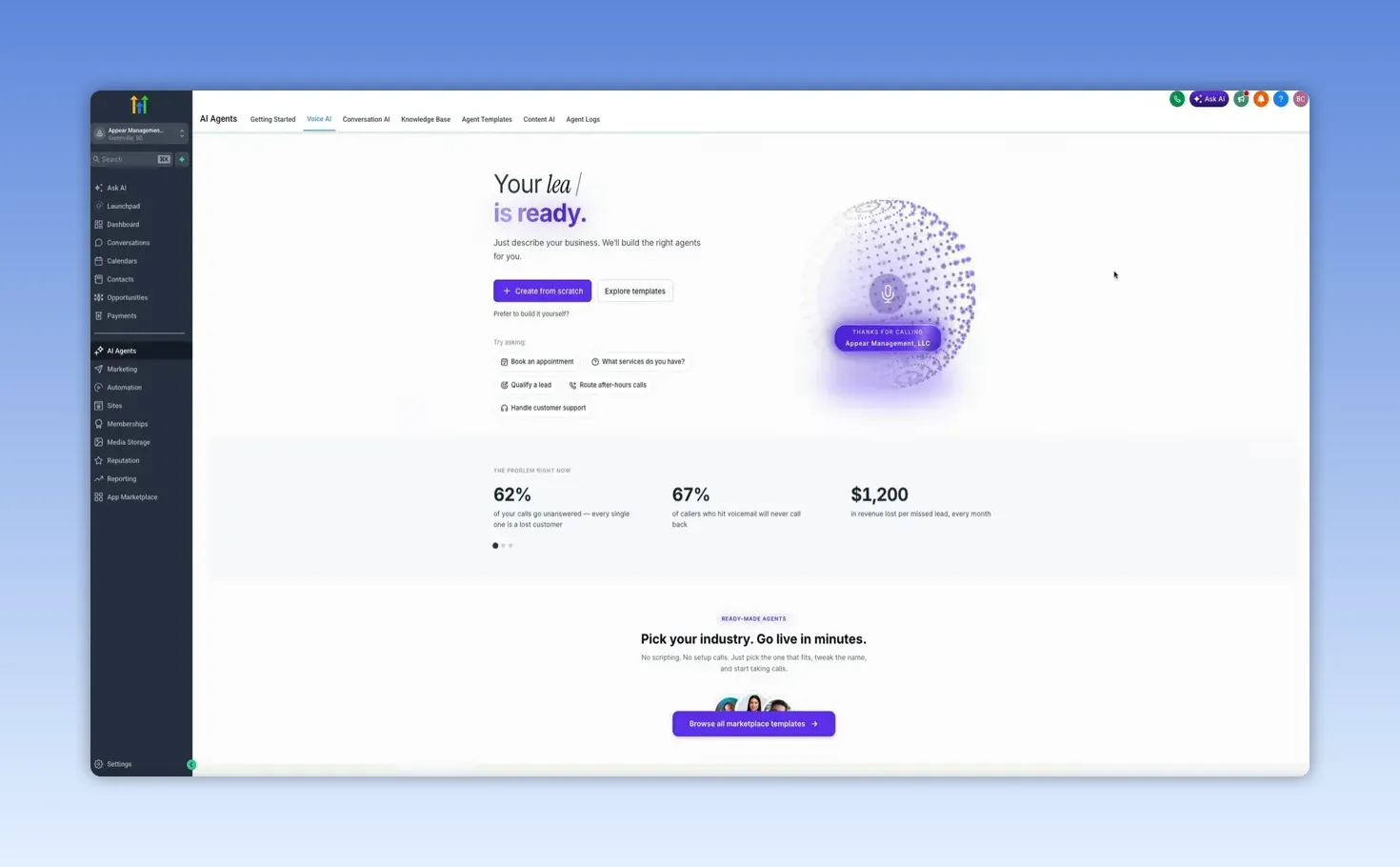
When it comes time to build your own, GoHighLevel gives you two paths.
Create from scratch
This gives you full control. If you have a very specific call flow, niche process, or custom scripting need, this is the option to use.
Use a template
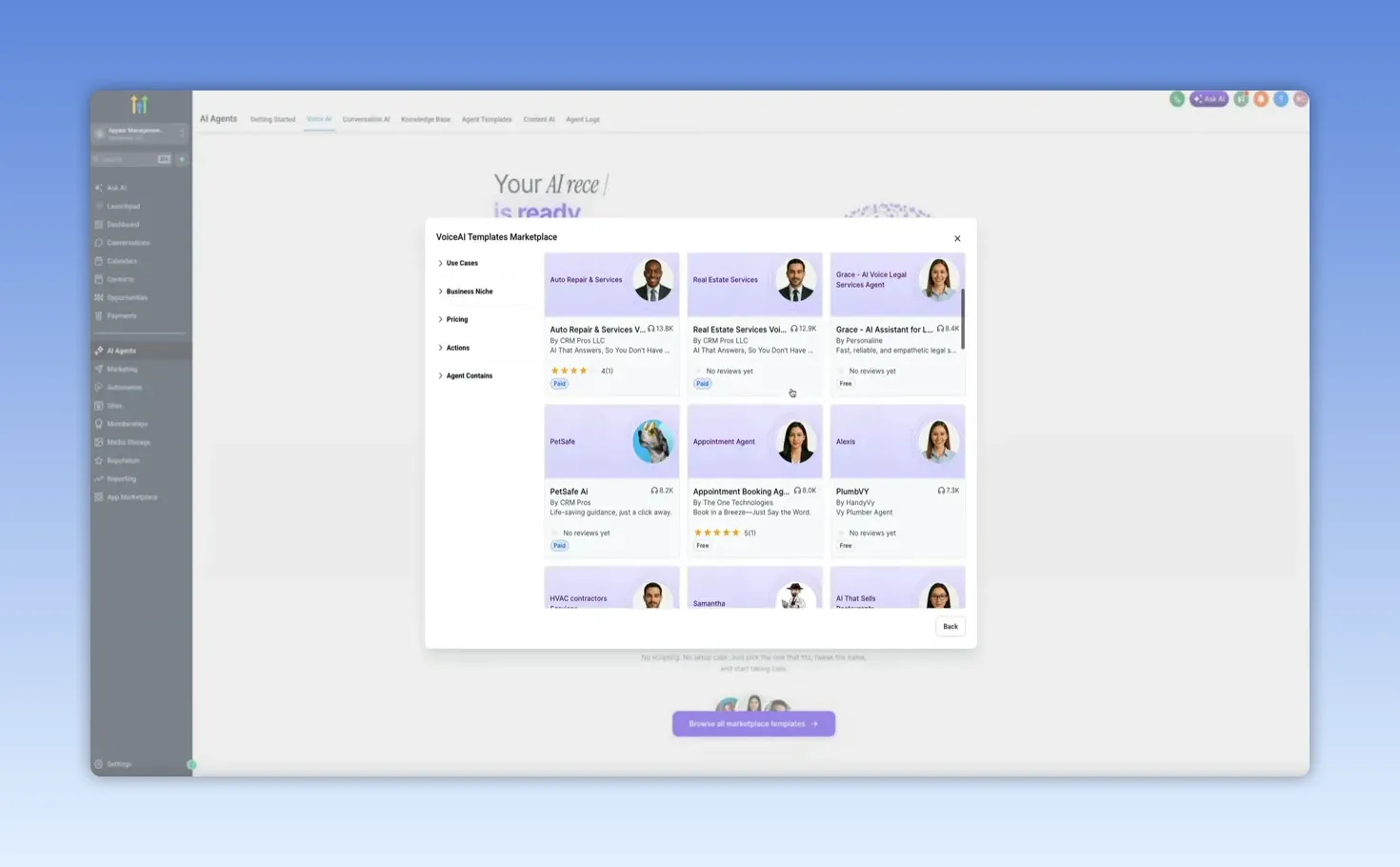
This is the faster route for most businesses. The template marketplace is packed with prebuilt voice AI agents, and you can filter by category, niche, pricing, and use case.
There are templates for industries like:
- Real estate
- Service businesses
- Legal firms
- Ecommerce brands
- Membership and advertising related use cases
So instead of building everything from zero, you can choose a template that is already close to your use case, tweak the name, connect your number, and get live much faster.
Conversation AI: A chatbot builder for multi channel lead handling
The next major tool is Conversation AI, which is GoHighLevel's chatbot builder for text based conversations.
This is built to handle messages automatically across multiple channels, including the kinds of places leads and customers already reach out. It is designed for ongoing communication, lead qualification, appointment booking, and customer support, all without requiring you to manually respond every time.
When you first land here, you are on the Conversation AI dashboard. Once bots are active, this area becomes your monitoring center for performance and activity.
Two important controls stand out right away:
- Manage Knowledge Base, where you feed the bot your business information
- Create Bot, where you choose how the chatbot will be built
Two ways to build a chatbot
GoHighLevel gives you two different build styles.
1. Prompt based
This is the simpler option. You write instructions, and the AI follows them. It is a solid choice for things like FAQs, appointment scheduling, and lead qualification.
2. Flow based
This is the more advanced visual builder. It lets you create structured conversation paths with branching logic, conditions, multi step nurturing, and more sophisticated capture processes.
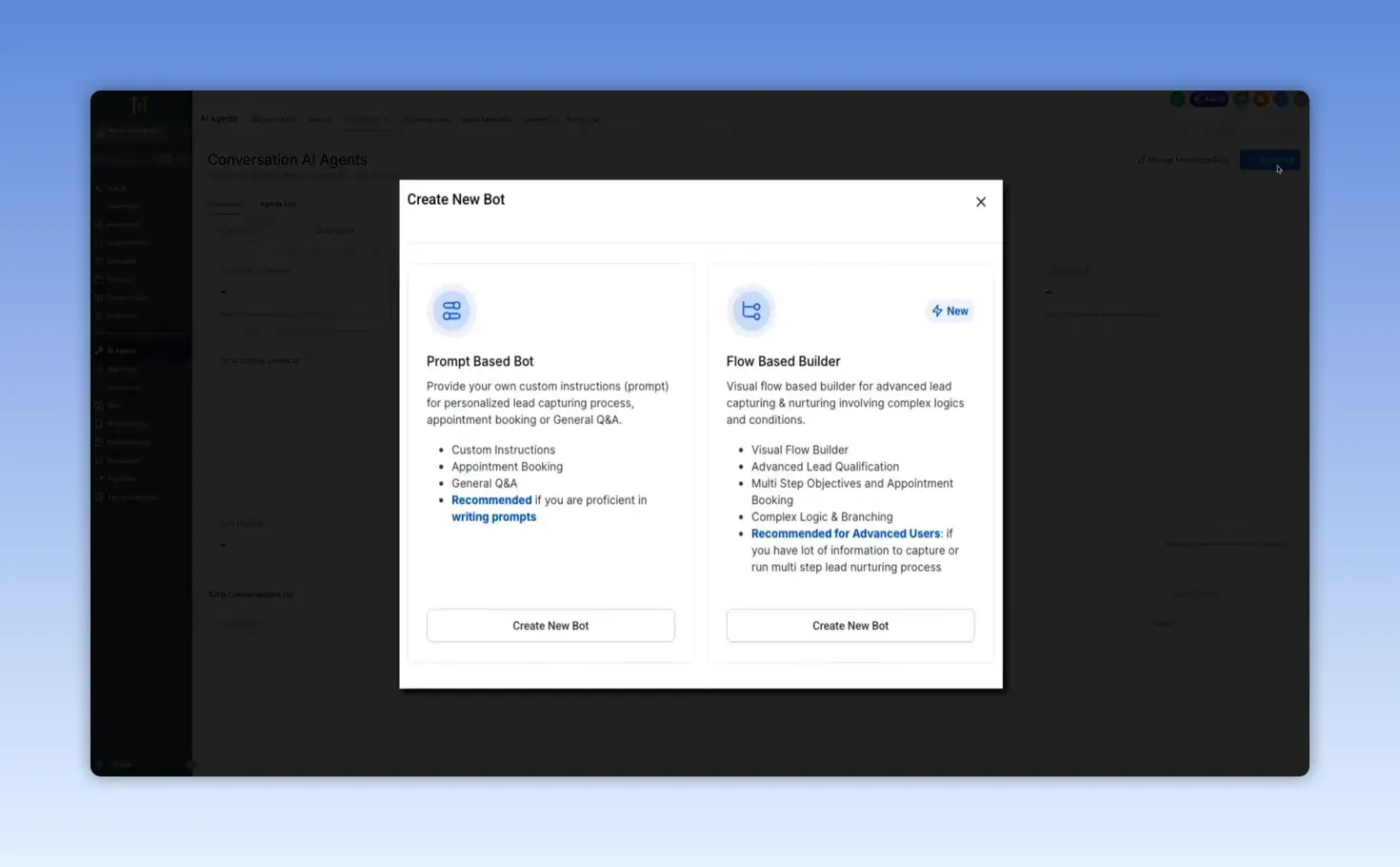
If you already know GoHighLevel's flow builder, the advanced option will feel pretty familiar.
Managing and testing your bots
After you create a bot, it shows up under the Agents List tab. From there, you can see the bot name, status, active channels, and last updated date. Opening a bot gives you access to several important areas:
- Bot Settings for foundational configuration
- Bot Training for connecting knowledge bases and routing logic
- Bot Goals for personality, tone, purpose, and actions
- Dashboard for overall performance
The Bot Training section is where things get practical. This is where you connect the information the bot should pull from when answering questions. You can even route conversations to different knowledge bases depending on context if your business needs more than one source of truth.
And on the right side, there is a Test Your Bot panel so you can chat with it before it ever interacts with a real lead. That is a big deal because it lets you verify whether the bot is actually pulling the right information and responding the way you intended.
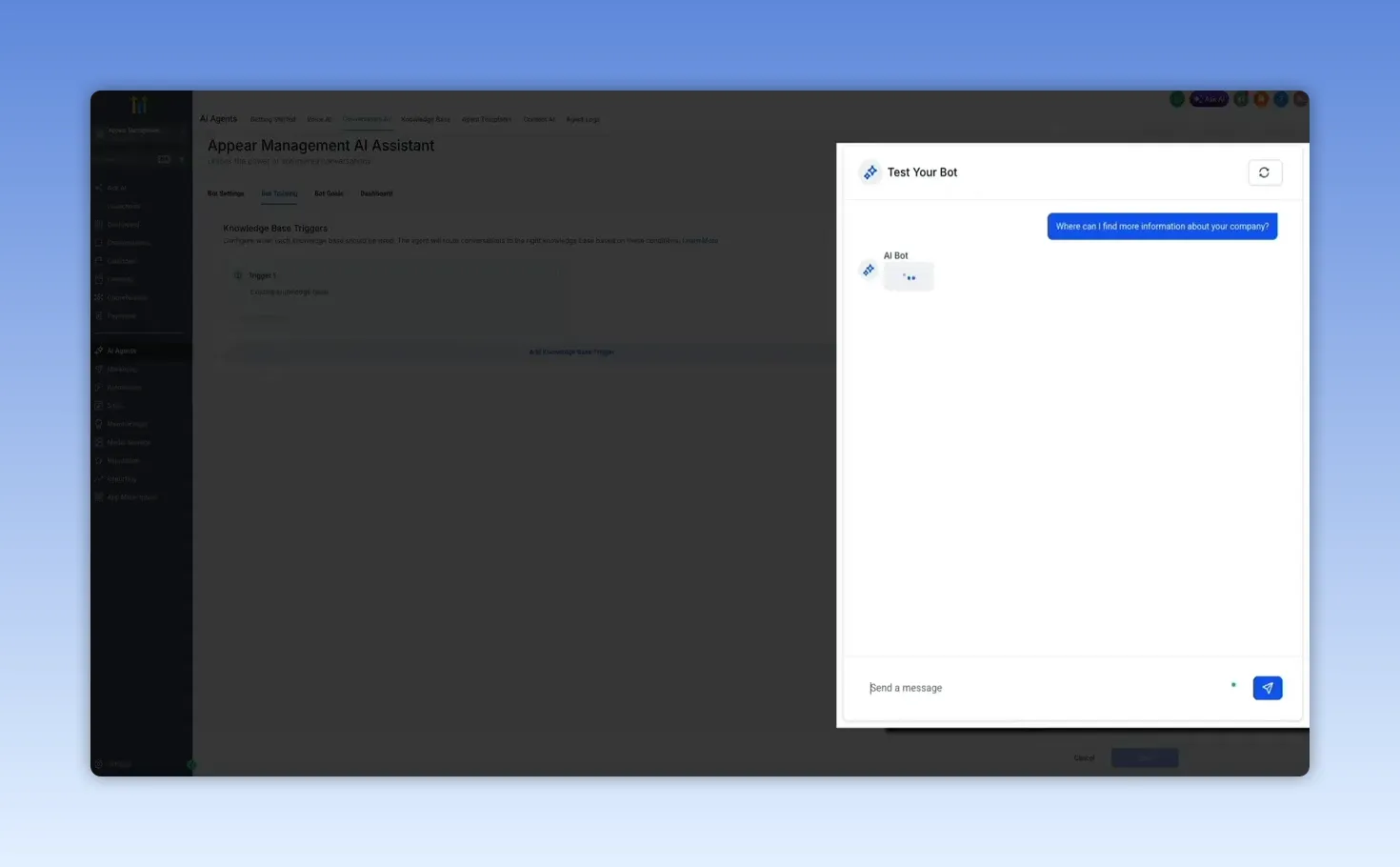
In the demo, the bot was asked where someone could learn more about the company. It responded with an on brand answer, pointed to the business website, explained what the company does, and offered more help. That is the ideal use case for a trained chatbot. It is not just replying. It is guiding.
Bot goals are where behavior gets defined
The Bot Goals section is where you define the bot's core identity and behavior. This includes:
- Personality for tone and communication style
- Goal for what the bot should accomplish
- Additional information for context about your business
- Actions like booking appointments, triggering workflows, or capturing contact information
Once that configuration is done, the chatbot can effectively work in the background all day long, handling conversations, moving leads forward, and helping convert interest into action.
Content AI: Built in writing and image generation
Another piece of the AI Studio is Content AI. This is GoHighLevel's built in AI content generator for text and images.
The value here is convenience. Instead of bouncing between GoHighLevel and a separate writing or image tool, you can create content directly inside the platform.
That can be useful for tasks like:
- Marketing copy
- Promotional content
- Supporting visuals
- Campaign assets created without leaving your account
There is one important note here. Content AI is tied to GoHighLevel's AI Employee subscription. That tier was described as costing $97 per month and includes unlimited access to the AI tools, so if content generation is a meaningful part of your workflow, that upgrade may make sense.
AI powered automations: Build workflows from plain English
This is probably the most exciting part of the whole setup.
Inside the Automation section, where GoHighLevel workflows live, there is a feature called Build Using AI. It is still in beta, but even now it is impressive.
When you click it, a prompt appears asking a simple question: What do you want to automate?
You can choose from suggested starting points like lead nurturing, form automation, or email campaigns, or you can simply describe the workflow you want in plain English and let the AI generate a starting structure for you.
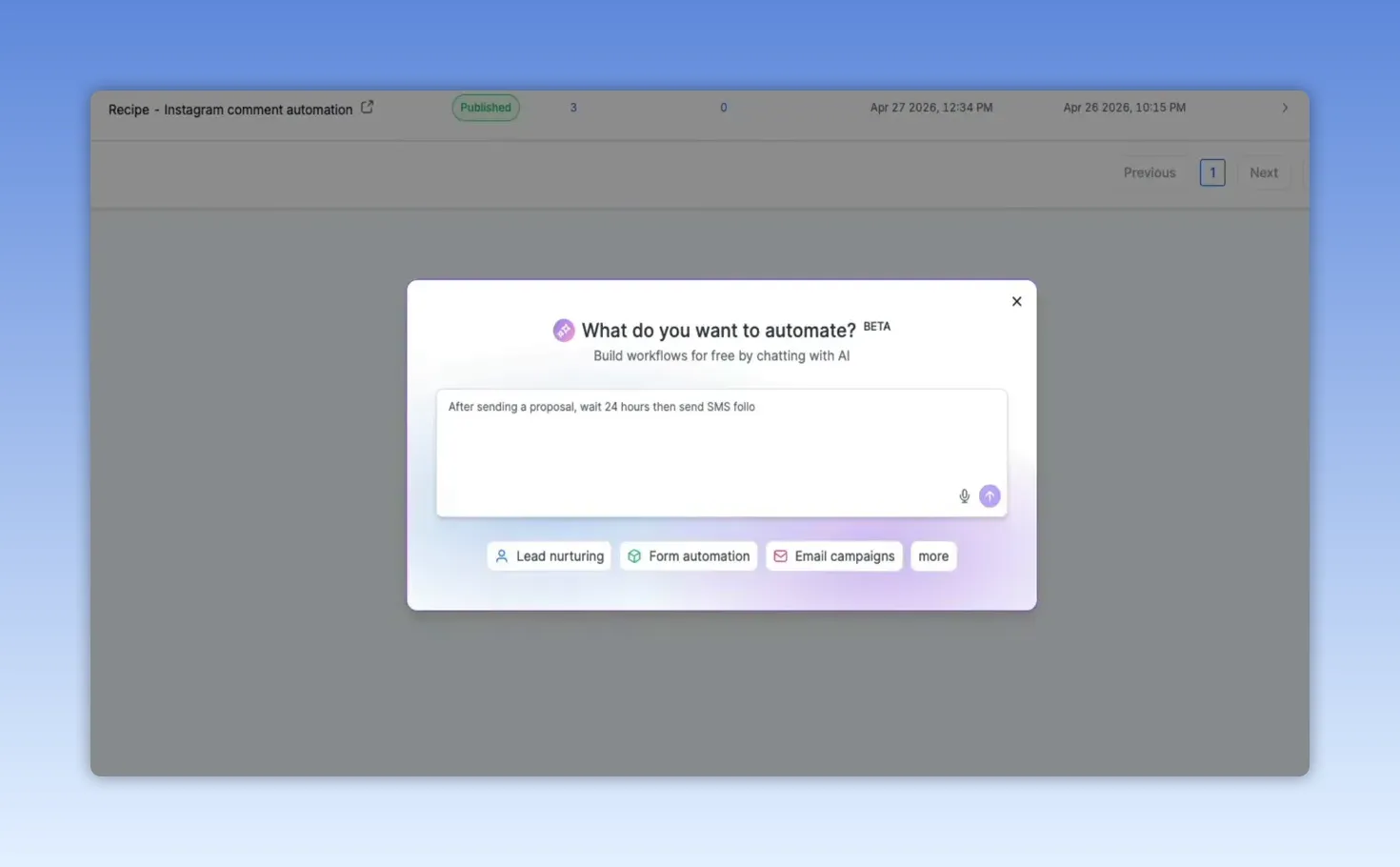
In the example shown, selecting an email campaign style prompt dropped a generated workflow directly into the workflow builder.
From there, the screen is split into two useful parts:
- Left side: an AI chat panel that explains what it built
- Right side: the visual workflow canvas with the actual steps
The AI outlines the workflow name, trigger, and each action in plain language, which makes it easy to understand what was created and why.
On the canvas side, you can see the workflow laid out visually. In the demo, the flow included steps such as:
- A trigger at the top
- An SMS greeting sent before a birthday
- A wait step until the actual birthday
- An email with a special offer
- An end step
And all of that came from one prompt.
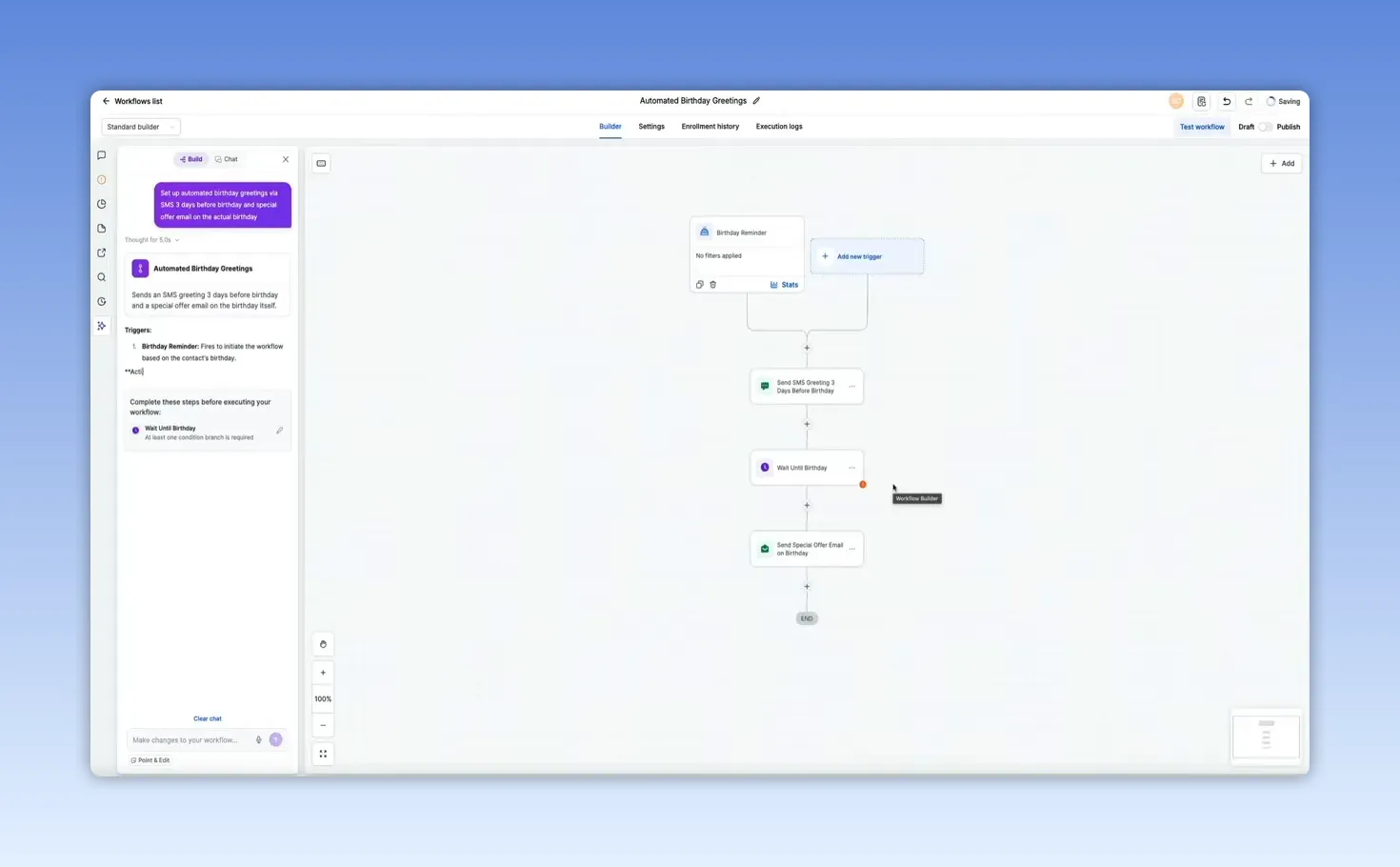
What makes this feature so good is that it is not a static preview. You can click into the workflow steps and edit them. You can also continue the conversation with AI in the side panel and ask it to modify what it built.
That creates a genuinely collaborative build process:
- Describe what you want
- Let AI build the first version
- Refine the workflow together
- Customize the details until it matches your process
If you want a deeper step by step breakdown of GoHighLevel automations specifically, there is a separate automation tutorial that walks through building one from start to finish.
What this means for a real business
When you step back and look at everything together, GoHighLevel's AI tools are covering several major business functions inside one platform:
- Support and guidance with Ask AI
- Inbound call handling with Voice AI
- Lead and customer messaging with Conversation AI
- Content creation with Content AI
- Process automation with AI built workflows
That is a pretty strong stack, especially if your goal is to reduce manual work, respond faster, and build systems that keep working even when you are not actively in the middle of every task.
The biggest takeaway is that these tools are not isolated features. They are much more powerful when they are connected. A lead can come in, get handled by chat, routed into a workflow, followed up automatically, and booked into an appointment flow with AI supporting each step.
Final thoughts
GoHighLevel's AI Studio has moved well beyond basic AI add ons. It is becoming a serious operating layer for lead generation, communication, content, and automation.
If you are brand new to the platform, this gives you a strong starting point. And if you have been using GoHighLevel for a while but have not touched the AI tools yet, there is a lot here worth exploring.
If you want to test everything for yourself, you can start with a free 30 day GoHighLevel trial. That gives you plenty of time to get inside the platform, experiment with the AI features, and start building out systems that actually save time and generate results.
For more tutorials and resources, you can also find more at Blog With Ben.
GoHighLevel has been expanding its AI tools fast, and if you have not explored that side of the platform lately, there is a good chance you will be surprised by how much is already built in.
This is not just a basic chatbot or a couple of AI powered shortcuts. GoHighLevel now includes an actual AI Studio with tools that can answer platform questions, handle calls, manage chat conversations, generate content, and even build workflows from a single prompt.
If you are trying to figure out what is available and where each tool fits, this walkthrough will give you a clear picture of what GoHighLevel AI can actually do for a business.
Ask AI: Your built in GoHighLevel assistant
The first tool worth knowing about is Ask AI. This is essentially a smart assistant that lives inside GoHighLevel and understands the platform itself.
That distinction matters. It is not giving broad, generic AI answers. It is trained specifically around GoHighLevel, which means it can help with platform features, setup steps, troubleshooting, and account configuration without sending you off to dig through help docs.
You can find it in the left sidebar under Ask AI, marked with a sparkle icon. The interface feels familiar right away. There is a conversation history on the left, a new chat option when you want to start fresh, and a central input box where you can type your question.
A useful example is asking something strategic, not just technical. For instance, asking what types of AI agents you can implement to generate leads and revenue produces a detailed, platform specific response. Instead of vague suggestions, Ask AI breaks down the actual agent types available in GoHighLevel, such as voice agents, chat widgets, and conversation AI.
What makes it especially useful is that it does not stop at naming features. It explains what each one does, where it fits in a lead generation process, and how the tools can work together as part of a larger system.
It also shows its reasoning on the side while it works, so you can see it searching and assembling the response in real time. That gives the tool a more guided, helpful feel than a standard support bot.
The part I really like is the follow-up flow. Once it gives you an answer, you can keep going in the same conversation and Ask AI will hold the context. So if you say you want help setting up a specific tool, it shifts from explanation mode into setup mode.
For example, asking it to walk through the Voice AI chat widget produces step by step instructions such as:
- Enable the feature in settings
- Configure the agent
- Generate the embed code
- Add it to your site
- Test it live
It even includes practical tips for getting better results. That is what makes Ask AI so useful. It functions more like an on demand GoHighLevel expert than a simple Q&A tool.
AI Agent Studio: Where the business facing AI tools live
Once you move from asking questions to actually deploying AI, the next stop is AI Agents in the left sidebar. This opens GoHighLevel's AI Agent Studio.
There is a Get Started button that opens a guided setup panel on the right side of the screen. It begins with a built in AI prompt asking what kind of agent you want to set up, which is a nice touch because it removes a lot of the guesswork when you are starting from scratch.
Inside the studio, the key tabs covered here are:
- Voice AI
- Conversation AI
- Content AI
Each one handles a different part of the customer journey.
Voice AI: An AI phone agent that can answer and book around the clock
The Voice AI tab is where you can build an AI support or booking agent that handles phone conversations.
One of the best features here is the built in live testing. You can tap to talk and have a real conversation with the agent before rolling it out. In the demo, the agent handled an appointment booking conversation naturally, responded to follow up questions, and stayed on track even when the conversation tried to zigzag a little.
That is exactly what you want from a phone AI tool. It should not sound robotic, and it should not fall apart the moment someone asks for clarification. A good voice agent needs to be able to:
- Answer questions instantly
- Offer available appointment times
- Collect names and email addresses
- Keep context throughout the conversation
- Stay available 24 hours a day
When it comes time to build your own, GoHighLevel gives you two paths.
Create from scratch
This gives you full control. If you have a very specific call flow, niche process, or custom scripting need, this is the option to use.
Use a template
This is the faster route for most businesses. The template marketplace is packed with prebuilt voice AI agents, and you can filter by category, niche, pricing, and use case.
There are templates for industries like:
- Real estate
- Service businesses
- Legal firms
- Ecommerce brands
- Membership and advertising related use cases
So instead of building everything from zero, you can choose a template that is already close to your use case, tweak the name, connect your number, and get live much faster.
Conversation AI: A chatbot builder for multi channel lead handling
The next major tool is Conversation AI, which is GoHighLevel's chatbot builder for text based conversations.
This is built to handle messages automatically across multiple channels, including the kinds of places leads and customers already reach out. It is designed for ongoing communication, lead qualification, appointment booking, and customer support, all without requiring you to manually respond every time.
When you first land here, you are on the Conversation AI dashboard. Once bots are active, this area becomes your monitoring center for performance and activity.
Two important controls stand out right away:
- Manage Knowledge Base, where you feed the bot your business information
- Create Bot, where you choose how the chatbot will be built
Two ways to build a chatbot
GoHighLevel gives you two different build styles.
1. Prompt based
This is the simpler option. You write instructions, and the AI follows them. It is a solid choice for things like FAQs, appointment scheduling, and lead qualification.
2. Flow based
This is the more advanced visual builder. It lets you create structured conversation paths with branching logic, conditions, multi step nurturing, and more sophisticated capture processes.
If you already know GoHighLevel's flow builder, the advanced option will feel pretty familiar.
Managing and testing your bots
After you create a bot, it shows up under the Agents List tab. From there, you can see the bot name, status, active channels, and last updated date. Opening a bot gives you access to several important areas:
- Bot Settings for foundational configuration
- Bot Training for connecting knowledge bases and routing logic
- Bot Goals for personality, tone, purpose, and actions
- Dashboard for overall performance
The Bot Training section is where things get practical. This is where you connect the information the bot should pull from when answering questions. You can even route conversations to different knowledge bases depending on context if your business needs more than one source of truth.
And on the right side, there is a Test Your Bot panel so you can chat with it before it ever interacts with a real lead. That is a big deal because it lets you verify whether the bot is actually pulling the right information and responding the way you intended.
In the demo, the bot was asked where someone could learn more about the company. It responded with an on brand answer, pointed to the business website, explained what the company does, and offered more help. That is the ideal use case for a trained chatbot. It is not just replying. It is guiding.
Bot goals are where behavior gets defined
The Bot Goals section is where you define the bot's core identity and behavior. This includes:
- Personality for tone and communication style
- Goal for what the bot should accomplish
- Additional information for context about your business
- Actions like booking appointments, triggering workflows, or capturing contact information
Once that configuration is done, the chatbot can effectively work in the background all day long, handling conversations, moving leads forward, and helping convert interest into action.
Content AI: Built in writing and image generation
Another piece of the AI Studio is Content AI. This is GoHighLevel's built in AI content generator for text and images.
The value here is convenience. Instead of bouncing between GoHighLevel and a separate writing or image tool, you can create content directly inside the platform.
That can be useful for tasks like:
- Marketing copy
- Promotional content
- Supporting visuals
- Campaign assets created without leaving your account
There is one important note here. Content AI is tied to GoHighLevel's AI Employee subscription. That tier was described as costing $97 per month and includes unlimited access to the AI tools, so if content generation is a meaningful part of your workflow, that upgrade may make sense.
AI powered automations: Build workflows from plain English
This is probably the most exciting part of the whole setup.
Inside the Automation section, where GoHighLevel workflows live, there is a feature called Build Using AI. It is still in beta, but even now it is impressive.
When you click it, a prompt appears asking a simple question: What do you want to automate?
You can choose from suggested starting points like lead nurturing, form automation, or email campaigns, or you can simply describe the workflow you want in plain English and let the AI generate a starting structure for you.
In the example shown, selecting an email campaign style prompt dropped a generated workflow directly into the workflow builder.
From there, the screen is split into two useful parts:
- Left side: an AI chat panel that explains what it built
- Right side: the visual workflow canvas with the actual steps
The AI outlines the workflow name, trigger, and each action in plain language, which makes it easy to understand what was created and why.
On the canvas side, you can see the workflow laid out visually. In the demo, the flow included steps such as:
- A trigger at the top
- An SMS greeting sent before a birthday
- A wait step until the actual birthday
- An email with a special offer
- An end step
And all of that came from one prompt.
What makes this feature so good is that it is not a static preview. You can click into the workflow steps and edit them. You can also continue the conversation with AI in the side panel and ask it to modify what it built.
That creates a genuinely collaborative build process:
- Describe what you want
- Let AI build the first version
- Refine the workflow together
- Customize the details until it matches your process
If you want a deeper step by step breakdown of GoHighLevel automations specifically, there is a separate automation tutorial that walks through building one from start to finish.
What this means for a real business
When you step back and look at everything together, GoHighLevel's AI tools are covering several major business functions inside one platform:
- Support and guidance with Ask AI
- Inbound call handling with Voice AI
- Lead and customer messaging with Conversation AI
- Content creation with Content AI
- Process automation with AI built workflows
That is a pretty strong stack, especially if your goal is to reduce manual work, respond faster, and build systems that keep working even when you are not actively in the middle of every task.
The biggest takeaway is that these tools are not isolated features. They are much more powerful when they are connected. A lead can come in, get handled by chat, routed into a workflow, followed up automatically, and booked into an appointment flow with AI supporting each step.
Final thoughts
GoHighLevel's AI Studio has moved well beyond basic AI add ons. It is becoming a serious operating layer for lead generation, communication, content, and automation.
If you are brand new to the platform, this gives you a strong starting point. And if you have been using GoHighLevel for a while but have not touched the AI tools yet, there is a lot here worth exploring.
If you want to test everything for yourself, you can start with a free 30 day GoHighLevel trial. That gives you plenty of time to get inside the platform, experiment with the AI features, and start building out systems that actually save time and generate results.
For more tutorials and resources, you can also find more at Blog With Ben.

Written by Ben Cummings
Founder of blogwithben.com
Ben is the Co-Founder of Sage Wave Media, LLC which is the parent company of Blog With Ben. He enjoys teaching, blogging, startups, a hoppy IPA, and college basketball. Whenever he's not blogging, you can find him cruising around sunny San Diego with his amazing family.
0 Comments