
Recall 2.0 Review: Build an AI Knowledge Engine Beyond Notion & Obsidian
Recall 2.0 Review: Build an AI Knowledge Engine Beyond Notion & Obsidian
AI gave everyone the same brain.
That sounds dramatic, but think about it for a second. You, me, your competitor, and the person who started yesterday all have access to the same models, the same intelligence, and the same general superpowers.
So if everyone has the same AI, your edge is no longer the model.
It is your knowledge, your context, and all the ideas you have been collecting over time. The articles you read. The podcasts you saved. The videos you learned from. The notes you wrote at 11:30 p.m. when something finally clicked.
The problem is that most of that knowledge is scattered across a dozen different apps, and your AI tools cannot really use it.
ChatGPT does not know what podcast you listened to this morning. Claude does not know about the research paper you saved last week. Perplexity has no clue what notes you took yesterday.
That is why Recall 2.0 is so interesting.
It takes what used to feel like a read-it-later app and turns it into something much bigger: a personal knowledge engine that can actually power your AI workflow.
What Recall 2.0 actually is
At its core, Recall is a place where your knowledge and your AI live together.
You save what matters. You write what you think. Over time, you build a system that knows what you know.
That is the key difference.
A lot of tools can store information. Far fewer can turn that information into something intelligent and usable.
Recall lets you save:
- YouTube videos
- Podcasts
- PDFs
- Articles
- TikToks
- Web pages
- Books
- Wikipedia pages
Then it automatically:
- Summarizes the content
- Organizes it
- Tags it
- Connects it to the rest of your knowledge base
With Recall 2.0, that foundation is now paired with agentic chat, multiple AI model options, and API/MCP access so your knowledge is no longer trapped inside one app.
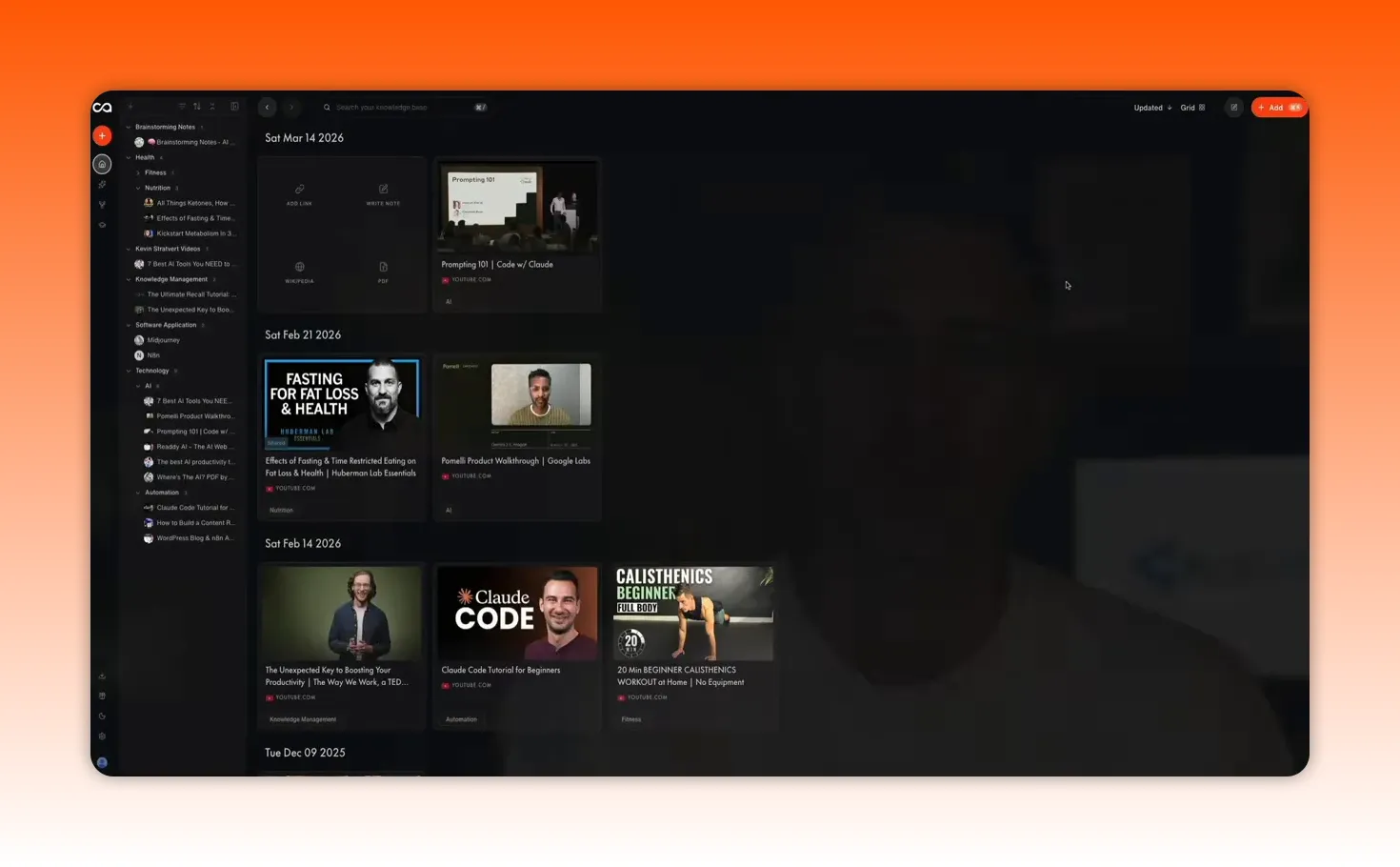
The interface got a serious upgrade
One of the first things that stands out in Recall 2.0 is the redesign.
The interface has been refreshed from the ground up, and that matters more than people think. When a tool is supposed to become your everyday knowledge hub, the friction has to be low. If saving, organizing, and chatting with your information feels clunky, you simply will not use it consistently enough for it to compound.
Recall 2.0 feels much cleaner and more direct. Important actions are easier to find, and the dashboard makes core features more accessible right away.
Getting content into Recall is almost effortless
A knowledge system only works if you actually feed it.
This is where Recall does a really good job. It makes capturing information ridiculously simple.
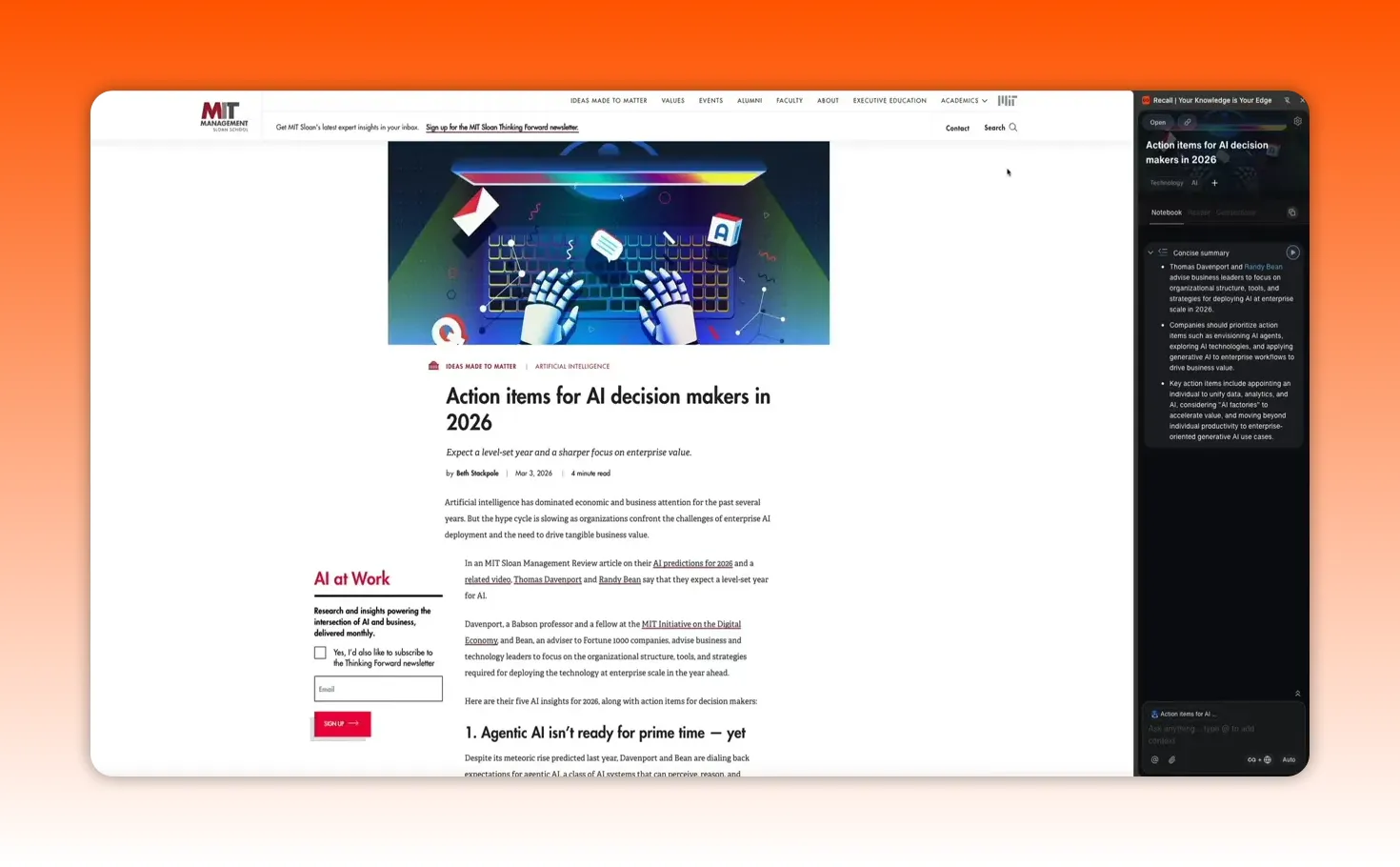
Using the browser extension
The fastest way to save content is the free Recall Chrome extension.
If you are reading an article online, you can click the extension icon and Recall will generate a concise summary right on the page. From there, hitting Save and Open sends that page into your knowledge base, complete with summary, automatic tagging, and organization.
No copying into Notion. No manual filing. No folder chaos.
Just one click.
Saving YouTube videos
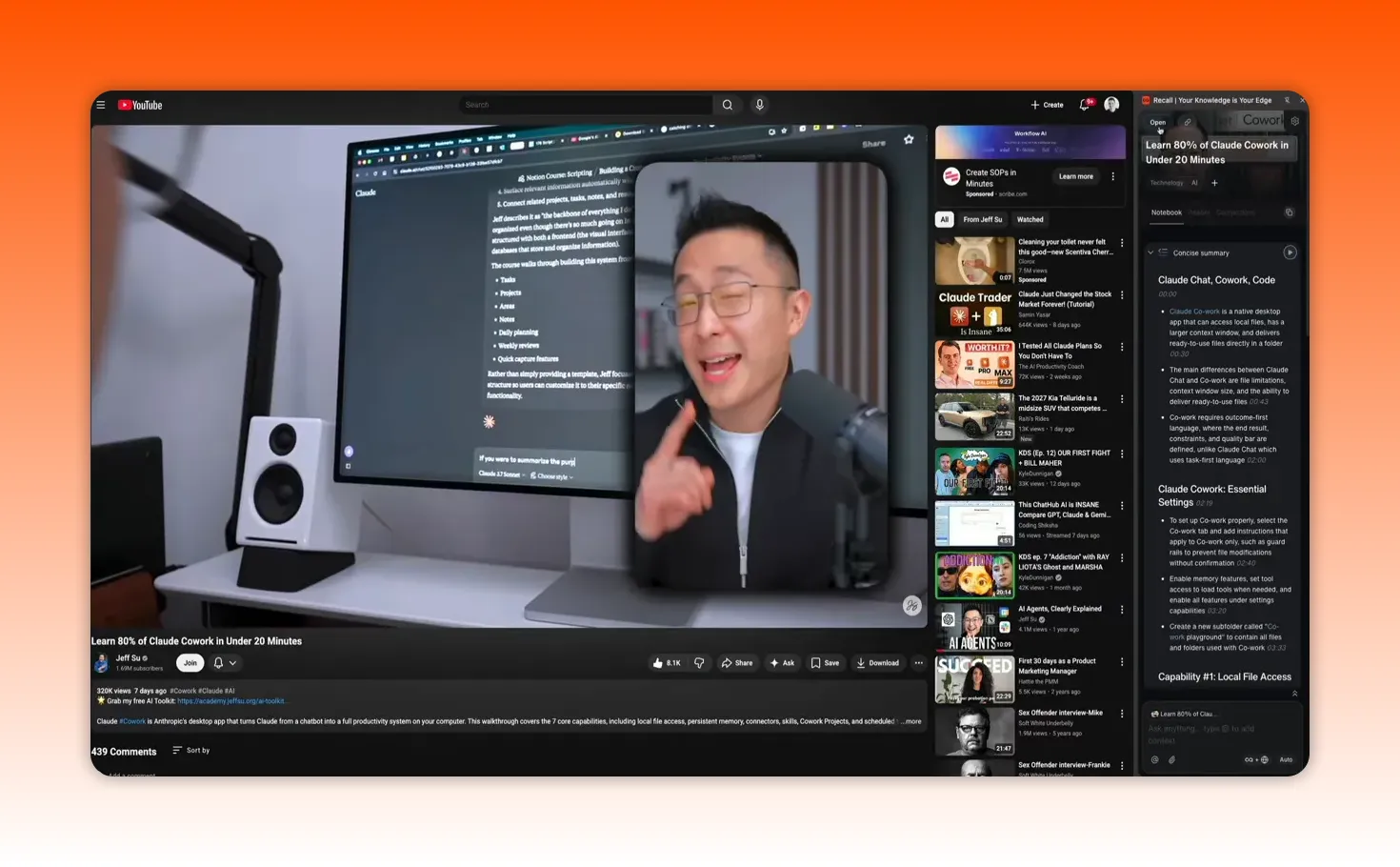
Recall also works well with YouTube content.
When you use the extension on a video, it can generate:
- A full summary
- Key takeaways
- Timestamps
That means a video is not just something you bookmarked and forgot about. It becomes searchable, reviewable, and usable later inside your knowledge base.
You can revisit it, quiz yourself on it, or ask AI questions about it without having to manually scrub through the timeline again.
Saving content from mobile
On mobile, the workflow is similar. If you come across something on X, TikTok, or another app, you can share it directly into Recall.
It gets summarized, tagged, and saved in the same way.
That breadth matters. A lot of tools handle one or two content types well. Recall is trying to become the place where all of your online learning and idea collection lives.
No tiny source cap
Another practical advantage is that there is no source limit like the one that can become frustrating in tools such as NotebookLM, where a 50-source cap per folder can show up quickly.
If you do serious research, that kind of limit is a real bottleneck. Recall avoids that problem.
You can write your own notes too, and that changes everything
Saving content is useful. But saving content alone is not enough.
Your actual advantage is not just what you consumed. It is what you thought about what you consumed.
Recall includes a dedicated Write Note button right on the dashboard, which opens a full block editor. Think something in the Notion family, with support for:
- Tables
- Code blocks
- LaTeX for math
- To-do lists
- Drag-and-drop blocks
That means you can take notes directly inside the same system where you save source material.
And this is the important part: your notes are not treated like dead text. They get the same AI treatment as everything else.
Your notes can be:
- Summarized
- Tagged
- Connected to other saved content
- Searched later
- Used in AI chat responses
So when you ask a question later, Recall is not only drawing from what you saved. It is also pulling from your own thinking.
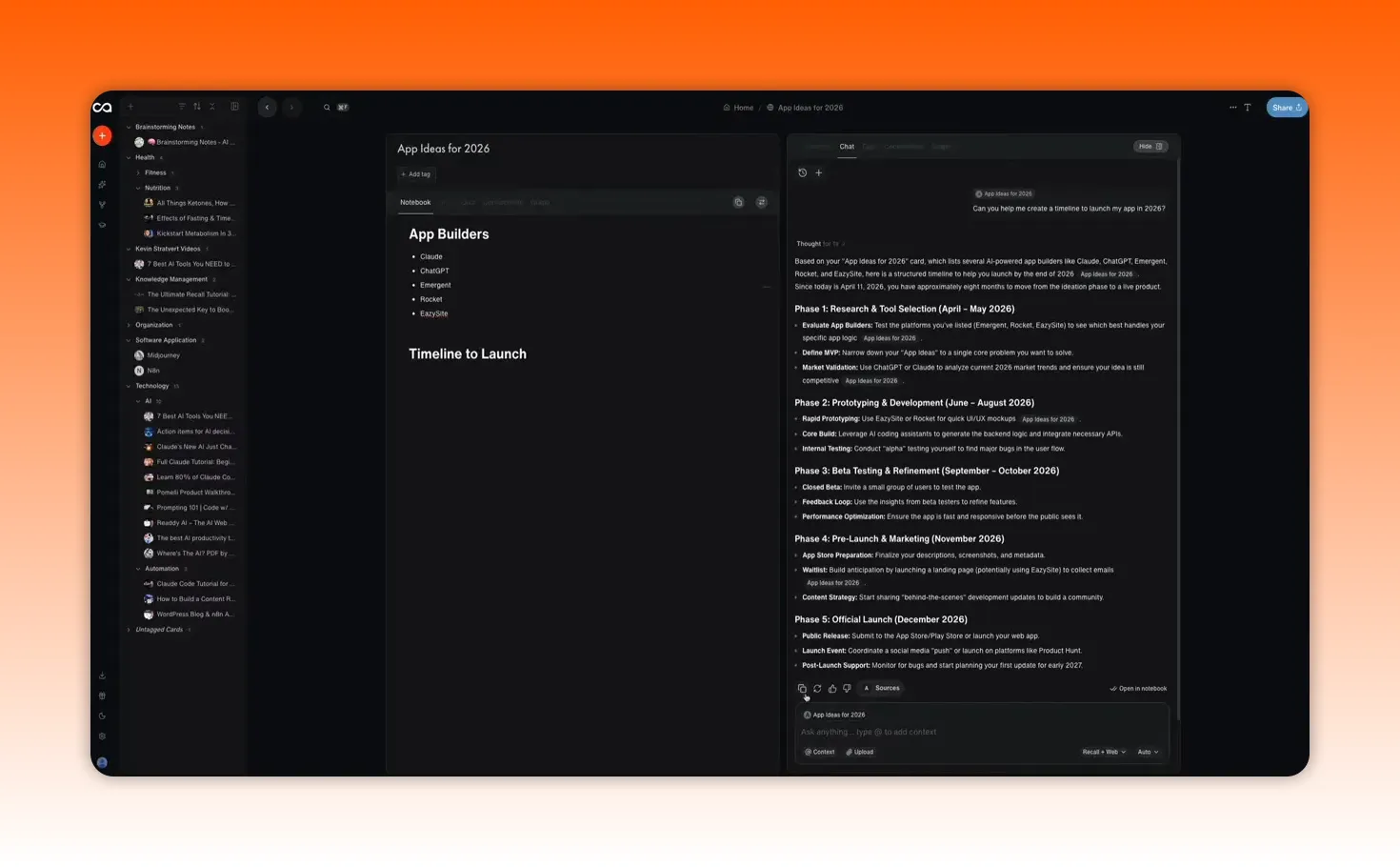
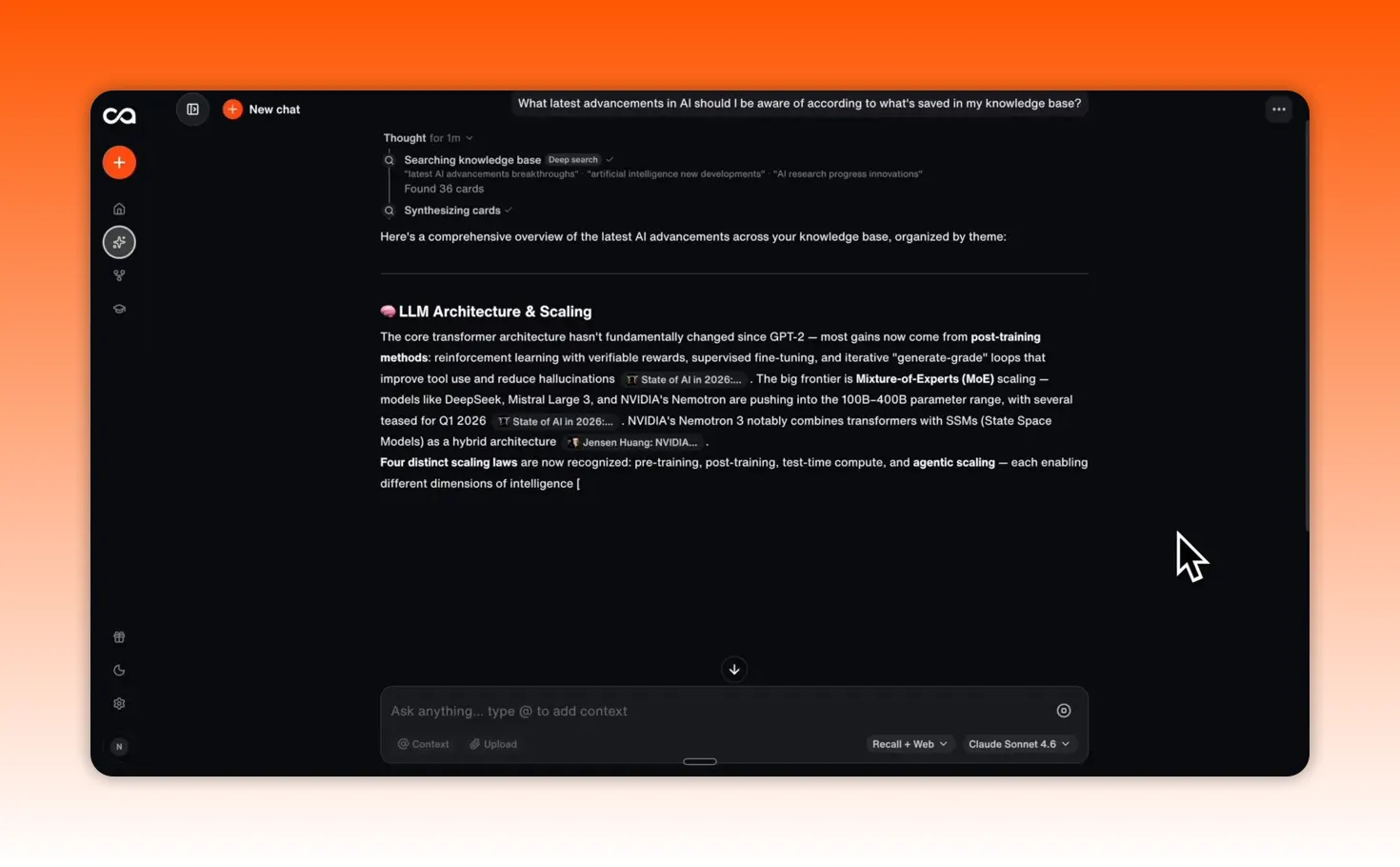
Agentic Chat is the feature that makes Recall 2.0 feel different
This is the biggest shift in the product.
Most AI tools force you into one of two modes:
- You are chatting with the internet.
- You upload documents for a single conversation.
Recall gives you three chat modes instead:
- Internet: chat like you would in a standard AI assistant
- Recall: chat with your personal knowledge base
- Both: combine your saved knowledge with fresh web context
That third mode is where things get really powerful.
Example: asking about something you learned days ago
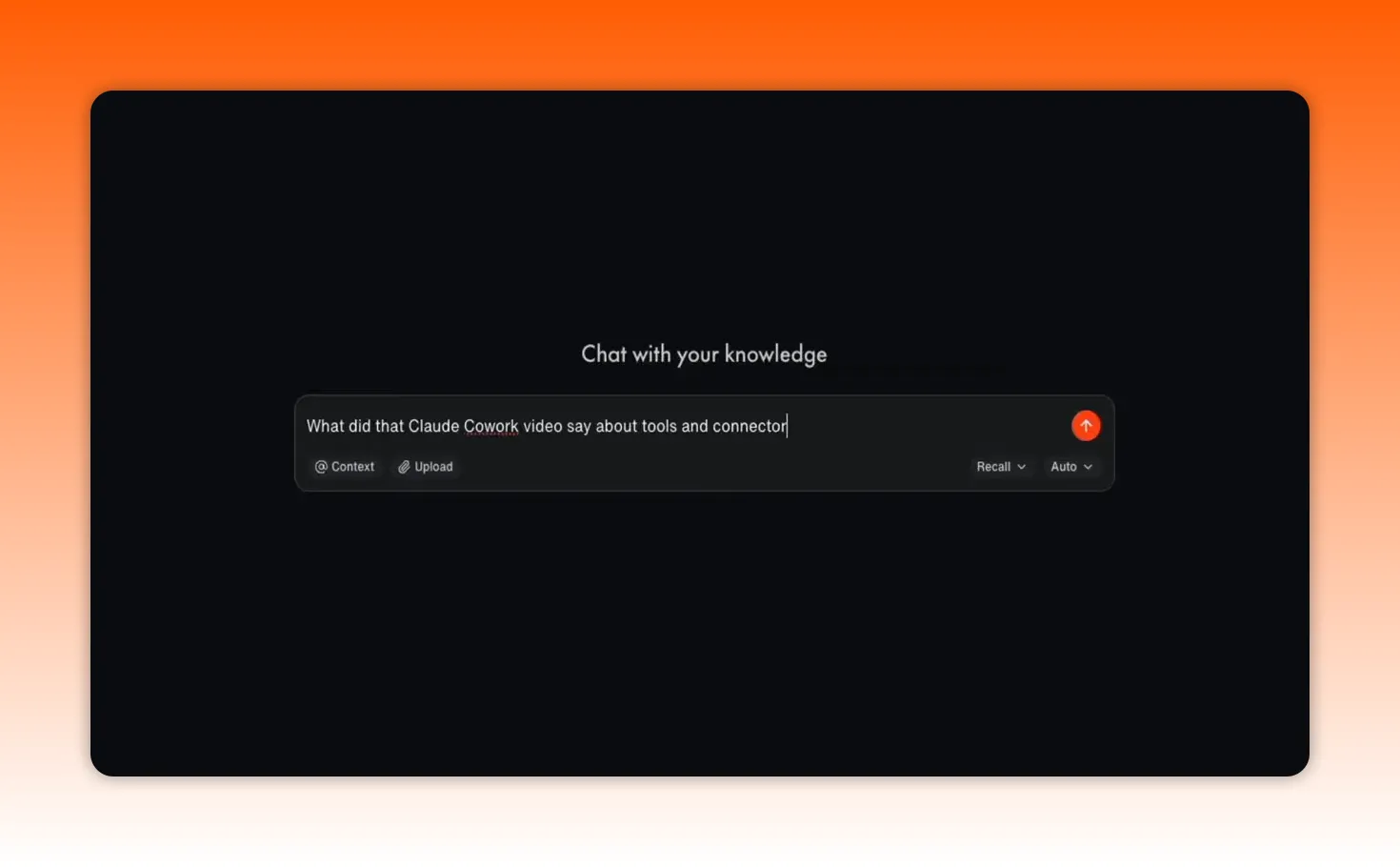
Imagine you saved several videos and articles about Claude. A few days later, you want to remember what one specific video said about tools and connectors.
Normally, you would have to:
- Find the video again
- Open it
- Scrub through the timeline
- Rewatch the relevant section
With Recall, you can just ask the question in chat, and it will pull the answer from your existing knowledge base.
That is a huge time saver, especially when your saved information starts stacking up over weeks and months.
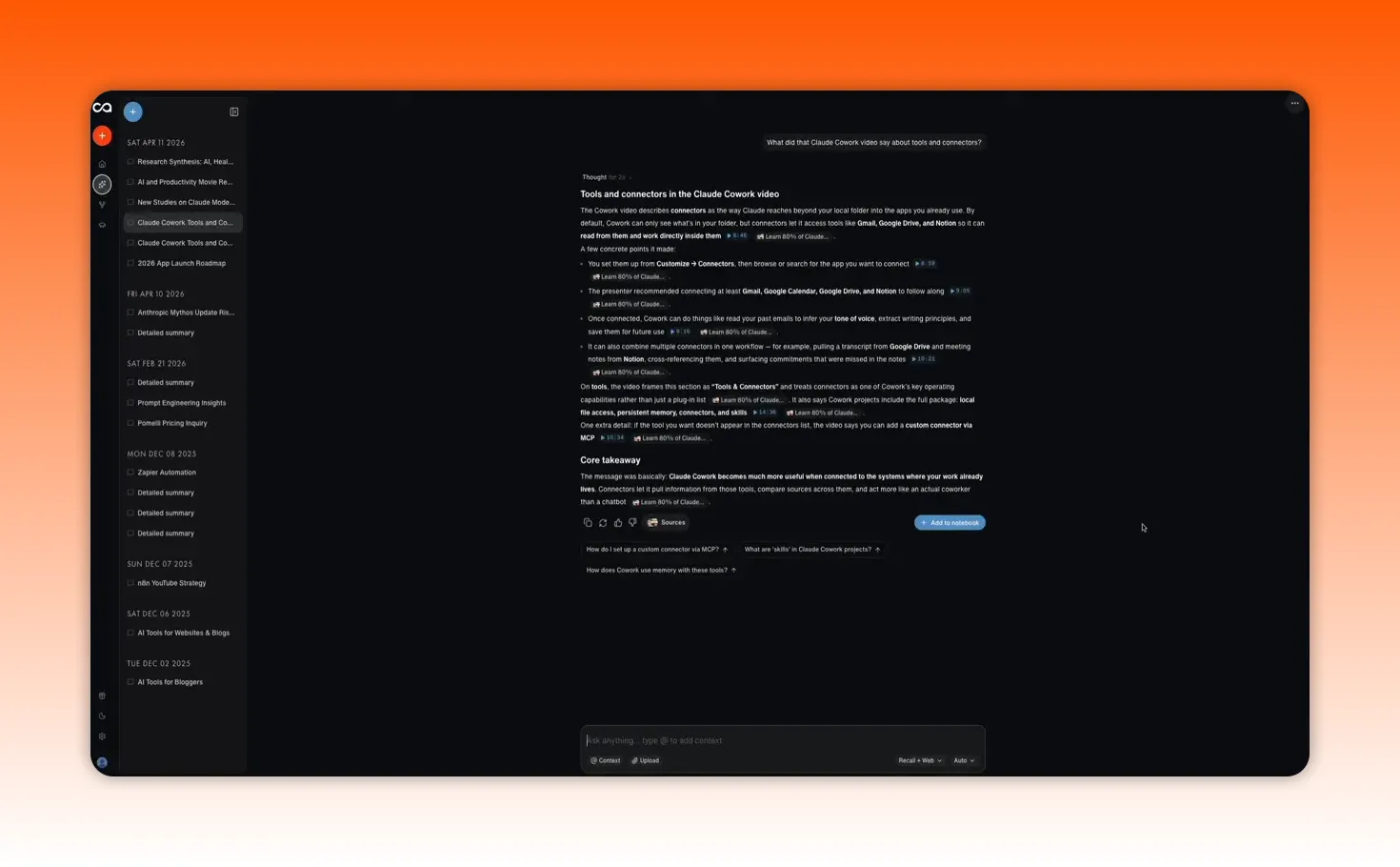
Blue chips and timestamped source navigation
One of the coolest newer features is the blue chips that appear in chat.
These are direct links to specific timestamps in the original YouTube videos where a point was mentioned.
So instead of getting only a summary, you can jump straight back to the exact moment where the idea appeared.
That makes the experience feel much more grounded. You are not just chatting with an abstraction. You are navigating your actual source material in a precise way.
Example: compressing months of research
Here is where Recall becomes genuinely useful for research-heavy work.
If you have spent months saving articles, PDFs, videos, and notes on a topic, you can ask Recall to condense that research into organized references with:
- Timestamps
- Page numbers
- Key quotes
Then you can ask it to check whether new studies have appeared since your last saved materials.
That is the kind of workflow that would normally eat hours.
Recall can do it in seconds because it already understands the body of knowledge you have been building.
Example: everyday recommendations based on your actual taste
It is not only for deep work and heavy research either.
You can ask it to pick a movie for the night based on everything you have loved this year, and because it has learned from your saved content and patterns, the suggestions can be surprisingly accurate.
That is a small example, but it points to something bigger: once your knowledge base becomes rich enough, your AI starts feeling personalized in a way generic chatbots usually do not.
You can choose your AI model instead of being locked into one
This is another feature that deserves more attention.
Recall lets you choose which model powers your chat experience. You can use:
- Claude
- GPT
- Gemini
- Auto-select mode
So if you prefer Claude for writing, use Claude. If you want GPT for coding tasks, use GPT. If another model fits a different task better, switch to that.
Or just let Recall decide automatically.
This flexibility is a real differentiator. A lot of knowledge tools lock you into a single model, which means you get the platform’s preferred AI whether it suits your workflow or not.
Recall removes that limitation.
API and MCP access make your knowledge portable
If you are a builder or a power user, this is one of the most important parts of Recall 2.0.
The platform launches with full API and MCP access, which means your Recall knowledge base can connect to the other AI tools you already use.
In practical terms, that means your saved knowledge does not have to stay trapped inside Recall.
You can bring that context into Claude, ChatGPT, or other compatible tools so your AI stack becomes more aware of your personal knowledge.
Your memory becomes portable.
Your context travels with you.
That is a big deal, because one of the most common frustrations with AI is that every tool starts from zero. Recall helps solve that by turning your collected knowledge into a layer that can move across your workflow.
The knowledge graph gives you a bird’s-eye view of your brain
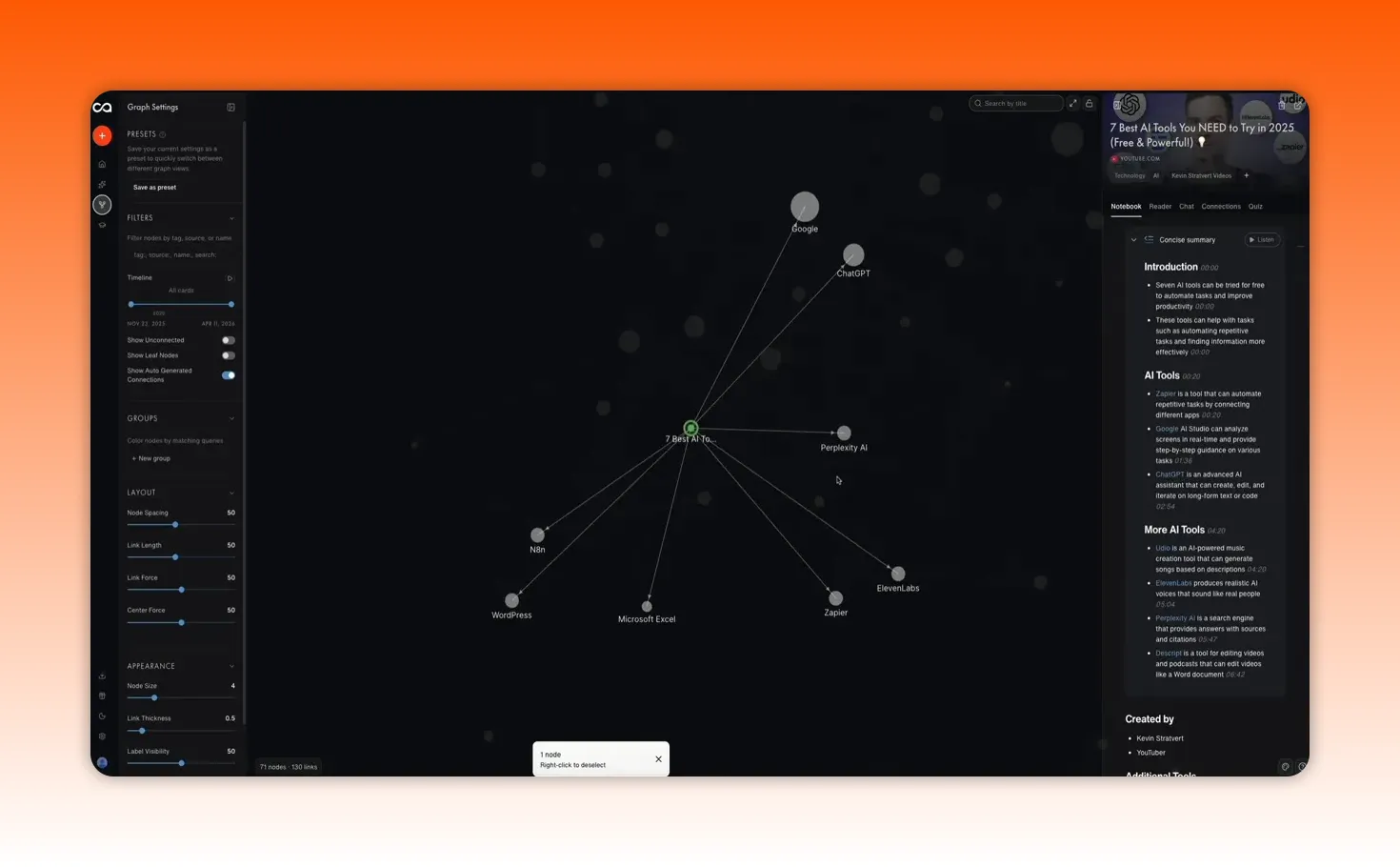
As you save content and write notes, Recall automatically builds a knowledge graph that maps how everything connects.
This is accessible from the sidebar, and it does more than look nice.
It helps you spot relationships between topics that you may not have noticed on your own.
You can click into nodes, inspect connected content, and discover idea clusters that were hiding in plain sight.
For anyone who likes making connections across subjects, this can become one of the most valuable parts of the product. It gives structure to your learning without requiring you to manually create links between everything.
Quiz 2.0 and spaced repetition help you actually remember what you learn
A lot of people collect information and call that learning.
It is not.
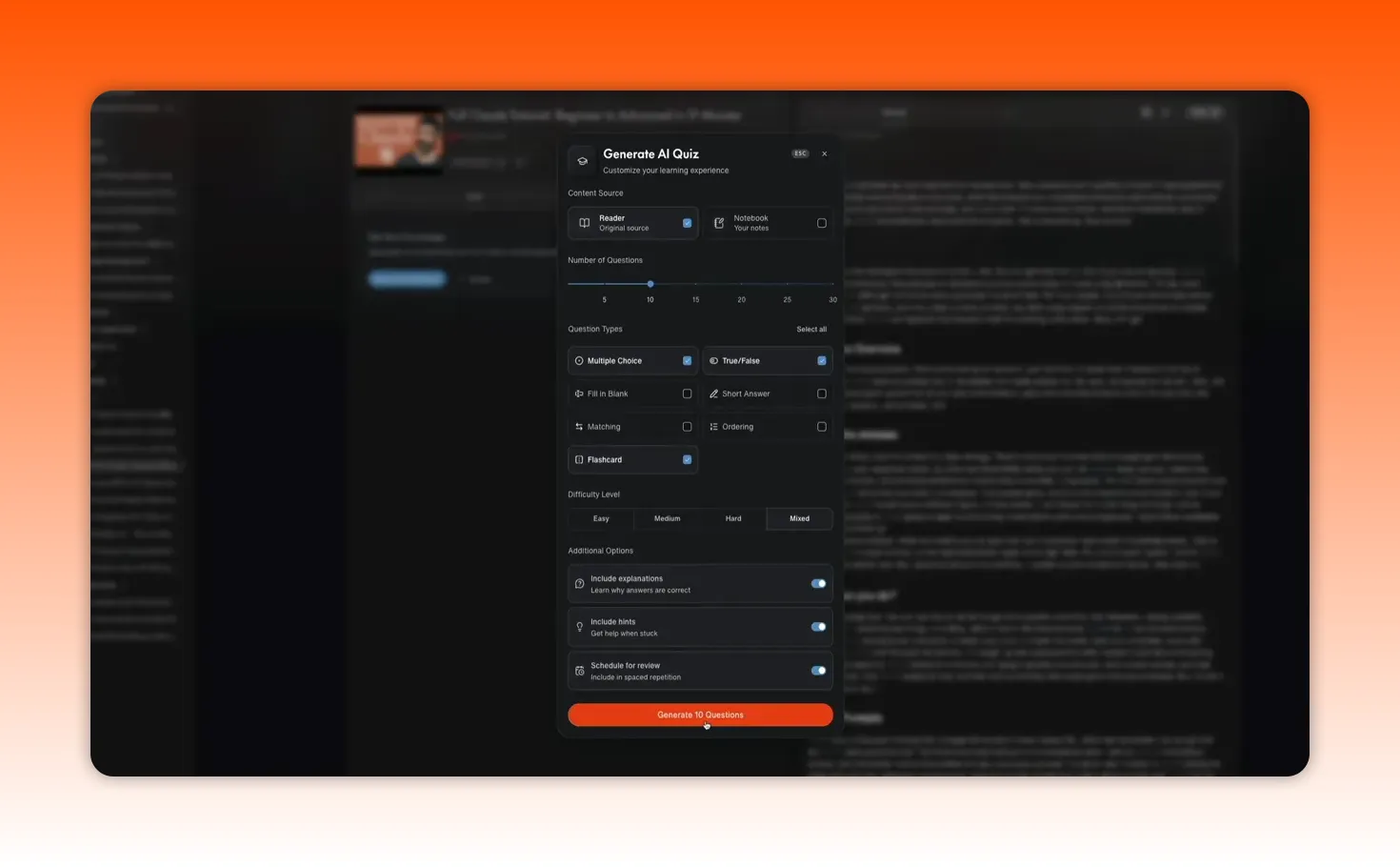
If you want information to stick, you have to revisit it. Recall addresses that with Quiz 2.0 and spaced repetition.
For any piece of saved content, you can click the quiz button and generate a personalized quiz based on that material.
That lets you:
- Test yourself on what you saved
- Track progress over time
- Use spaced repetition to review content on a smarter schedule
Instead of building a graveyard of saved articles and videos, you are turning your library into an active learning system.
Recall also supports shared quizzes, which means you can create a quiz on a topic and share it publicly for others to try.
Text-to-speech makes review more accessible and more personal
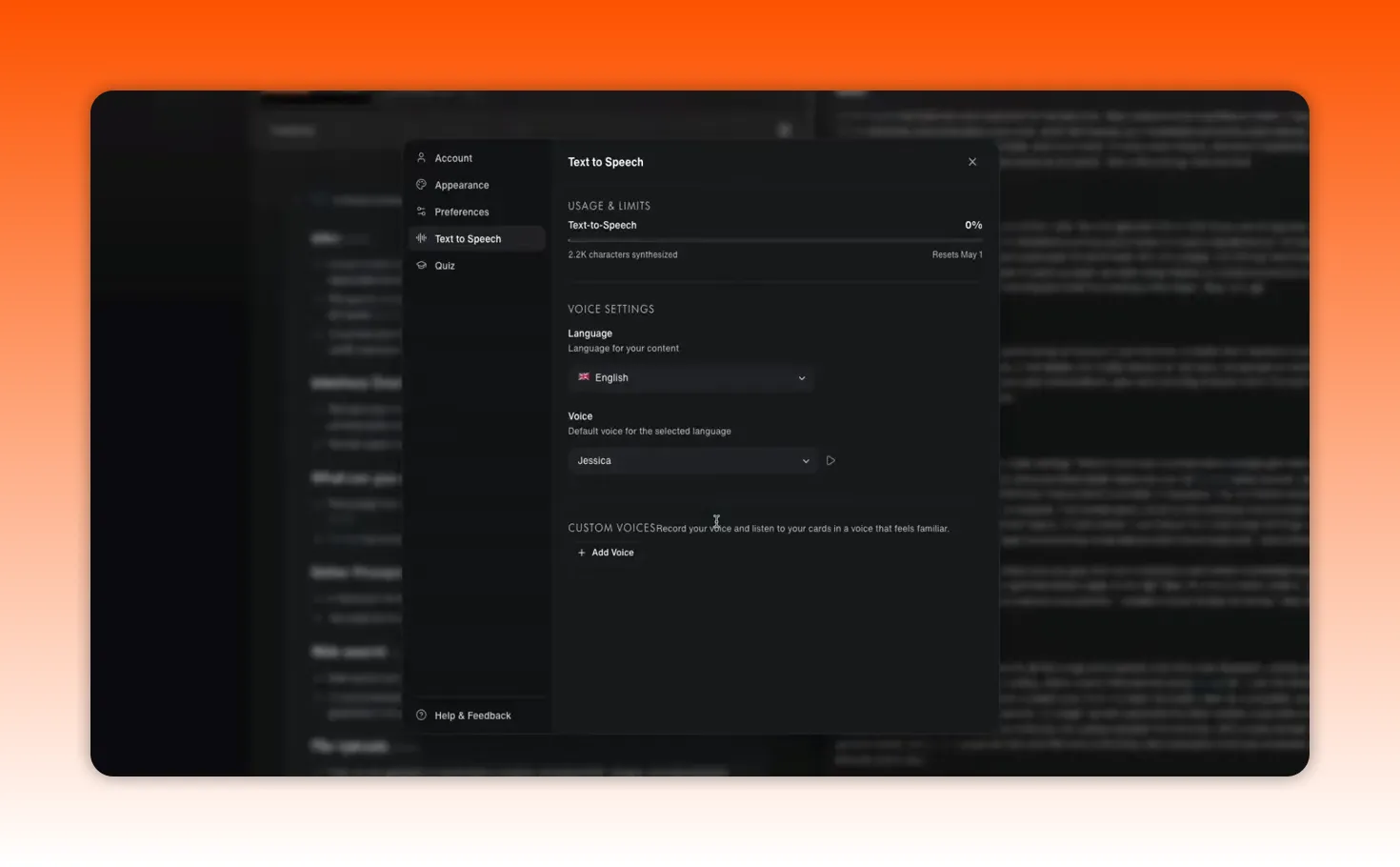
Another newer feature is text-to-speech for your summaries.
From any saved item, you can click Listen and have Recall read the summary back to you in a custom voice.
You can configure language and voice settings, and even clone a voice.
That opens up some interesting use cases. Some people set it up so a family member’s voice reads their summaries back to them, which is honestly pretty wild in the best way.
More importantly, it makes review easier. If you want to revisit material while walking, driving, or doing other tasks, turning summaries into audio is a practical quality-of-life feature.
Bulk actions are useful if your library is already large
For people who have been saving content for a while, Recall 2.0 also includes bulk actions.
You can mass:
- Summarize
- Tag
- Connect content
- Generate quizzes across your library
That is especially useful when you are trying to clean up or organize a growing knowledge base without handling everything one item at a time.
Why Recall 2.0 matters in the bigger AI landscape
To understand why Recall is compelling, it helps to look at the broader personal AI space.
Right now, there are basically three directions this market is moving in.
1. Chatbots
Tools like ChatGPT, Claude, Gemini, and Perplexity are adding memory features, but in most cases that memory is still mostly chat history.
They remember what you typed.
They do not really remember what you consumed, what you highlighted, what you saved, or what you thought about over time.
And each one tends to be tied to its own model ecosystem.
2. Memory layers
Then you have tools trying to make your context portable across chatbots. These are useful, but they are more like infrastructure than complete products.
They may help pass context between systems, but they do not usually give you content capture, automatic summaries, or a visual knowledge graph.
3. Knowledge bases
Finally, you have knowledge tools like NotebookLM and Notion.
NotebookLM is strong for research projects, but it is locked to Gemini, capped by source limits, and does not let you blend your own notes alongside sources in the same way.
Notion is a powerful workspace, but it is still primarily a structure-first tool. You have to do much more of the manual linking and setup yourself.
Recall sits across all three categories.
It is:
- A content capture tool
- A knowledge base
- A memory layer
- An AI chat interface
And it does that in one subscription instead of forcing you to duct-tape together three or four apps just to get a complete system.
The real value is that your knowledge compounds
A lot of AI products feel exciting on day one and disposable by day thirty.
That is one reason so many AI apps struggle with retention. If the product does not become more valuable the longer you use it, people churn fast.
Recall has a better shot than most because its value is cumulative.
The more you save, the smarter it gets.
The more notes you write, the more context it has.
The more patterns it sees, the more useful its recommendations and responses become.
Your knowledge compounds inside the system.
That is what makes this kind of product interesting. It is not just another AI tool. It is an attempt to build a personal layer of intelligence around your information.
Final thoughts
If you are serious about learning faster, thinking better, and actually using what you consume, Recall 2.0 is worth a close look.
What makes it stand out is not one flashy feature. It is the combination of things:
- Easy content capture
- Integrated note-taking
- Chat with your knowledge, the internet, or both
- Model flexibility across Claude, GPT, and Gemini
- API and MCP access for portability
- A knowledge graph for discovery
- Quizzes and spaced repetition for retention
- Text-to-speech for easier review
Put all of that together, and Recall starts to feel less like a bookmarking app and more like a personal AI operating layer for everything you learn online.
There is a free version available, so it is easy to get a feel for the workflow. But the real payoff comes when you commit to building your knowledge base over time. That is when the system starts becoming uniquely yours.
And that, more than anything, is the edge now.
AI gave everyone the same brain.
That sounds dramatic, but think about it for a second. You, me, your competitor, and the person who started yesterday all have access to the same models, the same intelligence, and the same general superpowers.
So if everyone has the same AI, your edge is no longer the model.
It is your knowledge, your context, and all the ideas you have been collecting over time. The articles you read. The podcasts you saved. The videos you learned from. The notes you wrote at 11:30 p.m. when something finally clicked.
The problem is that most of that knowledge is scattered across a dozen different apps, and your AI tools cannot really use it.
ChatGPT does not know what podcast you listened to this morning. Claude does not know about the research paper you saved last week. Perplexity has no clue what notes you took yesterday.
That is why Recall 2.0 is so interesting.
It takes what used to feel like a read-it-later app and turns it into something much bigger: a personal knowledge engine that can actually power your AI workflow.
What Recall 2.0 actually is
At its core, Recall is a place where your knowledge and your AI live together.
You save what matters. You write what you think. Over time, you build a system that knows what you know.
That is the key difference.
A lot of tools can store information. Far fewer can turn that information into something intelligent and usable.
Recall lets you save:
- YouTube videos
- Podcasts
- PDFs
- Articles
- TikToks
- Web pages
- Books
- Wikipedia pages
Then it automatically:
- Summarizes the content
- Organizes it
- Tags it
- Connects it to the rest of your knowledge base
With Recall 2.0, that foundation is now paired with agentic chat, multiple AI model options, and API/MCP access so your knowledge is no longer trapped inside one app.
The interface got a serious upgrade
One of the first things that stands out in Recall 2.0 is the redesign.
The interface has been refreshed from the ground up, and that matters more than people think. When a tool is supposed to become your everyday knowledge hub, the friction has to be low. If saving, organizing, and chatting with your information feels clunky, you simply will not use it consistently enough for it to compound.
Recall 2.0 feels much cleaner and more direct. Important actions are easier to find, and the dashboard makes core features more accessible right away.
Getting content into Recall is almost effortless
A knowledge system only works if you actually feed it.
This is where Recall does a really good job. It makes capturing information ridiculously simple.
Using the browser extension
The fastest way to save content is the free Recall Chrome extension.
If you are reading an article online, you can click the extension icon and Recall will generate a concise summary right on the page. From there, hitting Save and Open sends that page into your knowledge base, complete with summary, automatic tagging, and organization.
No copying into Notion. No manual filing. No folder chaos.
Just one click.
Saving YouTube videos
Recall also works well with YouTube content.
When you use the extension on a video, it can generate:
- A full summary
- Key takeaways
- Timestamps
That means a video is not just something you bookmarked and forgot about. It becomes searchable, reviewable, and usable later inside your knowledge base.
You can revisit it, quiz yourself on it, or ask AI questions about it without having to manually scrub through the timeline again.
Saving content from mobile
On mobile, the workflow is similar. If you come across something on X, TikTok, or another app, you can share it directly into Recall.
It gets summarized, tagged, and saved in the same way.
That breadth matters. A lot of tools handle one or two content types well. Recall is trying to become the place where all of your online learning and idea collection lives.
No tiny source cap
Another practical advantage is that there is no source limit like the one that can become frustrating in tools such as NotebookLM, where a 50-source cap per folder can show up quickly.
If you do serious research, that kind of limit is a real bottleneck. Recall avoids that problem.
You can write your own notes too, and that changes everything
Saving content is useful. But saving content alone is not enough.
Your actual advantage is not just what you consumed. It is what you thought about what you consumed.
Recall includes a dedicated Write Note button right on the dashboard, which opens a full block editor. Think something in the Notion family, with support for:
- Tables
- Code blocks
- LaTeX for math
- To-do lists
- Drag-and-drop blocks
That means you can take notes directly inside the same system where you save source material.
And this is the important part: your notes are not treated like dead text. They get the same AI treatment as everything else.
Your notes can be:
- Summarized
- Tagged
- Connected to other saved content
- Searched later
- Used in AI chat responses
So when you ask a question later, Recall is not only drawing from what you saved. It is also pulling from your own thinking.
Agentic Chat is the feature that makes Recall 2.0 feel different
This is the biggest shift in the product.
Most AI tools force you into one of two modes:
- You are chatting with the internet.
- You upload documents for a single conversation.
Recall gives you three chat modes instead:
- Internet: chat like you would in a standard AI assistant
- Recall: chat with your personal knowledge base
- Both: combine your saved knowledge with fresh web context
That third mode is where things get really powerful.
Example: asking about something you learned days ago
Imagine you saved several videos and articles about Claude. A few days later, you want to remember what one specific video said about tools and connectors.
Normally, you would have to:
- Find the video again
- Open it
- Scrub through the timeline
- Rewatch the relevant section
With Recall, you can just ask the question in chat, and it will pull the answer from your existing knowledge base.
That is a huge time saver, especially when your saved information starts stacking up over weeks and months.
Blue chips and timestamped source navigation
One of the coolest newer features is the blue chips that appear in chat.
These are direct links to specific timestamps in the original YouTube videos where a point was mentioned.
So instead of getting only a summary, you can jump straight back to the exact moment where the idea appeared.
That makes the experience feel much more grounded. You are not just chatting with an abstraction. You are navigating your actual source material in a precise way.
Example: compressing months of research
Here is where Recall becomes genuinely useful for research-heavy work.
If you have spent months saving articles, PDFs, videos, and notes on a topic, you can ask Recall to condense that research into organized references with:
- Timestamps
- Page numbers
- Key quotes
Then you can ask it to check whether new studies have appeared since your last saved materials.
That is the kind of workflow that would normally eat hours.
Recall can do it in seconds because it already understands the body of knowledge you have been building.
Example: everyday recommendations based on your actual taste
It is not only for deep work and heavy research either.
You can ask it to pick a movie for the night based on everything you have loved this year, and because it has learned from your saved content and patterns, the suggestions can be surprisingly accurate.
That is a small example, but it points to something bigger: once your knowledge base becomes rich enough, your AI starts feeling personalized in a way generic chatbots usually do not.
You can choose your AI model instead of being locked into one
This is another feature that deserves more attention.
Recall lets you choose which model powers your chat experience. You can use:
- Claude
- GPT
- Gemini
- Auto-select mode
So if you prefer Claude for writing, use Claude. If you want GPT for coding tasks, use GPT. If another model fits a different task better, switch to that.
Or just let Recall decide automatically.
This flexibility is a real differentiator. A lot of knowledge tools lock you into a single model, which means you get the platform’s preferred AI whether it suits your workflow or not.
Recall removes that limitation.
API and MCP access make your knowledge portable
If you are a builder or a power user, this is one of the most important parts of Recall 2.0.
The platform launches with full API and MCP access, which means your Recall knowledge base can connect to the other AI tools you already use.
In practical terms, that means your saved knowledge does not have to stay trapped inside Recall.
You can bring that context into Claude, ChatGPT, or other compatible tools so your AI stack becomes more aware of your personal knowledge.
Your memory becomes portable.
Your context travels with you.
That is a big deal, because one of the most common frustrations with AI is that every tool starts from zero. Recall helps solve that by turning your collected knowledge into a layer that can move across your workflow.
The knowledge graph gives you a bird’s-eye view of your brain
As you save content and write notes, Recall automatically builds a knowledge graph that maps how everything connects.
This is accessible from the sidebar, and it does more than look nice.
It helps you spot relationships between topics that you may not have noticed on your own.
You can click into nodes, inspect connected content, and discover idea clusters that were hiding in plain sight.
For anyone who likes making connections across subjects, this can become one of the most valuable parts of the product. It gives structure to your learning without requiring you to manually create links between everything.
Quiz 2.0 and spaced repetition help you actually remember what you learn
A lot of people collect information and call that learning.
It is not.
If you want information to stick, you have to revisit it. Recall addresses that with Quiz 2.0 and spaced repetition.
For any piece of saved content, you can click the quiz button and generate a personalized quiz based on that material.
That lets you:
- Test yourself on what you saved
- Track progress over time
- Use spaced repetition to review content on a smarter schedule
Instead of building a graveyard of saved articles and videos, you are turning your library into an active learning system.
Recall also supports shared quizzes, which means you can create a quiz on a topic and share it publicly for others to try.
Text-to-speech makes review more accessible and more personal
Another newer feature is text-to-speech for your summaries.
From any saved item, you can click Listen and have Recall read the summary back to you in a custom voice.
You can configure language and voice settings, and even clone a voice.
That opens up some interesting use cases. Some people set it up so a family member’s voice reads their summaries back to them, which is honestly pretty wild in the best way.
More importantly, it makes review easier. If you want to revisit material while walking, driving, or doing other tasks, turning summaries into audio is a practical quality-of-life feature.
Bulk actions are useful if your library is already large
For people who have been saving content for a while, Recall 2.0 also includes bulk actions.
You can mass:
- Summarize
- Tag
- Connect content
- Generate quizzes across your library
That is especially useful when you are trying to clean up or organize a growing knowledge base without handling everything one item at a time.
Why Recall 2.0 matters in the bigger AI landscape
To understand why Recall is compelling, it helps to look at the broader personal AI space.
Right now, there are basically three directions this market is moving in.
1. Chatbots
Tools like ChatGPT, Claude, Gemini, and Perplexity are adding memory features, but in most cases that memory is still mostly chat history.
They remember what you typed.
They do not really remember what you consumed, what you highlighted, what you saved, or what you thought about over time.
And each one tends to be tied to its own model ecosystem.
2. Memory layers
Then you have tools trying to make your context portable across chatbots. These are useful, but they are more like infrastructure than complete products.
They may help pass context between systems, but they do not usually give you content capture, automatic summaries, or a visual knowledge graph.
3. Knowledge bases
Finally, you have knowledge tools like NotebookLM and Notion.
NotebookLM is strong for research projects, but it is locked to Gemini, capped by source limits, and does not let you blend your own notes alongside sources in the same way.
Notion is a powerful workspace, but it is still primarily a structure-first tool. You have to do much more of the manual linking and setup yourself.
Recall sits across all three categories.
It is:
- A content capture tool
- A knowledge base
- A memory layer
- An AI chat interface
And it does that in one subscription instead of forcing you to duct-tape together three or four apps just to get a complete system.
The real value is that your knowledge compounds
A lot of AI products feel exciting on day one and disposable by day thirty.
That is one reason so many AI apps struggle with retention. If the product does not become more valuable the longer you use it, people churn fast.
Recall has a better shot than most because its value is cumulative.
The more you save, the smarter it gets.
The more notes you write, the more context it has.
The more patterns it sees, the more useful its recommendations and responses become.
Your knowledge compounds inside the system.
That is what makes this kind of product interesting. It is not just another AI tool. It is an attempt to build a personal layer of intelligence around your information.
Final thoughts
If you are serious about learning faster, thinking better, and actually using what you consume, Recall 2.0 is worth a close look.
What makes it stand out is not one flashy feature. It is the combination of things:
- Easy content capture
- Integrated note-taking
- Chat with your knowledge, the internet, or both
- Model flexibility across Claude, GPT, and Gemini
- API and MCP access for portability
- A knowledge graph for discovery
- Quizzes and spaced repetition for retention
- Text-to-speech for easier review
Put all of that together, and Recall starts to feel less like a bookmarking app and more like a personal AI operating layer for everything you learn online.
There is a free version available, so it is easy to get a feel for the workflow. But the real payoff comes when you commit to building your knowledge base over time. That is when the system starts becoming uniquely yours.
And that, more than anything, is the edge now.

Written by Ben Cummings
Founder of blogwithben.com
Ben is the Co-Founder of Sage Wave Media, LLC which is the parent company of Blog With Ben. He enjoys teaching, blogging, startups, a hoppy IPA, and college basketball. Whenever he's not blogging, you can find him cruising around sunny San Diego with his amazing family.
0 Comments